Repository navigation
R Session Watcher: Rmarkdown open HTML in webview #155
Description

Follow up on #103 (comment)
rmarkdown::run(file) works great but I don't think there is a vscode-R command for it yet. Also, a keyboard shortcut would be nice.
It would also be convenient to be able to render selected chunks of text + math + code and see them in a web viewer (i.e., if a section of a document is selected the rmarkdown::run processes only processes that part).
Activity
andycraig commentedon Jan 8, 2020
@vnijs
This by itself is easy, but if it needs to take into account the currently selected text then it would require some more work.
For variables defined above the section that has been selected, would their values be taken from the current R session, or by running all the above code but only displaying the selected part? For example, imagine this R markdown file:
If the current R session had
xset to2, would the rendering showxas1or2?vnijs commentedon Jan 9, 2020
"would their values be taken from the current R session". Yes. You can have Knitr / Rmarkdown run in a specified environment (e.g., Global).
There is already a keyboard short cut for running the whole file, although it doesn't open the html in preview. You can run also R-code from a code-chunk. However, you can't (yet) select a part of (large) Rmd document and preview that. I think that would be a great addition
andycraig commentedon Jan 9, 2020
@vnijs
Excellent!
One way of doing the selection preview would be to have vscode-R create a temporary Rmd file using the current file's YAML header, and just the selected text, and then render that using the Global environment.
My understanding is that the goal here is to have the whole file re-render when it is saved, and if some text is selected (without any save) then just that section is rendered. If that's correct, then I'm not sure we'd be able to use
rmarkdown::runas that wouldn't be able to handle the selection bit. But we should be able to trigger armarkdown::renderwhenever the file is saved, and create and render a temporary file whenever a selection is made.I really like R markdown but there's a lot about it I don't know, so if you have a simpler approach to what I've described above please let me know! Also let me know if I'm describing something a bit different from the feature you want.
vnijs commentedon Jan 9, 2020
That sounds great.
knitrhas the option to us text directly which is easy for a selection. `rmarkdown requires a (temp) file but is also more general. I haven't use rmarkdown::run but updating on each save seem like it could be rather computationally expensive. Happy to help with the R-part of this if I can.andycraig commentedon Jan 11, 2020
@vnijs I had a quick try with the
textargument ofknitr::knit:and it returned the string
"```\nx <- 1\n```", so I'm presumably not using it right. If you know what the correct way to handle a text argument is in order to get a rendered document could you let me know? Thank you!vnijs commentedon Jan 11, 2020
You were missing the
{r}. Below two examples. FYIknit2htmlreturns its output invisibly. The first option return a fully html page. The second returns just a "fragment" that you can embed in an html template that you provide.An example of how this could work with the global environment is shown below.
andycraig commentedon Jan 11, 2020
@vnijs Whoops, that was a stupid omission on my part! Thank you for those examples, they will make a very good reference.
vscode-R has a function
runSelectionOrWordwhich wraps the selected with specified strings and opening and closing parentheses, and then sends that to the console. This could almost be used to pass the selected text into theknitr::knit2htmlcall you've provided. It won't quite work as-is because it can't wrap the selected text in quote marks (although I suppose something could be done with Non-Standard Evaluation ...) The option to surround text in quote marks could be added very easily.The advantages of that approach would be that it can be done without much modification to vscode-R, and it wouldn't need to use temp files. The disadvantages would be that it would need to send all the selected text to the console, and that the user would need to perform a specific command to render the selection rather than having it render automatically whenever a selection is made. Since it would be easier to implement, I'm tempted to try that to start with.
vnijs commentedon Jan 11, 2020
Having
knitrfunctionality as a starting point would be great, I agree.andycraig commentedon Apr 16, 2020
@vnijs I haven't tried it yet but rendering the selection should now be possible using the
knit2htmlcode you provided earlier and therunCommandWithSelectionOrWordcommand. Example of how to userunCommandWithSelectionOrWordhere: https://github.com/Ikuyadeu/vscode-R#creating-keybindings-for-r-commandsvnijs commentedon Apr 18, 2020
Thanks @andycraig. I think this could work (see below). Is there a convenient way to have the result from
argsshown in a vscode webview?andycraig commentedon Apr 18, 2020
I’m not sure. @renkun-ken Any ideas?
renkun-ken commentedon Apr 18, 2020
If the output is a plain html file, then I don't know a simple way to show it in webview since it requires an HTTP server to provide a URL like the R html help.
vnijs commentedon Apr 28, 2020
Would that mean putting the file in a specific location/folder that would map to a url?
assignUser commentedon Aug 13, 2020
@renkun-ken Shouldn't this be now possible (as long as the html is within the users workspace) with Webview.asWebviewUri? I will try to test it but I am very new to vsc extension development ^-^
ElianHugh commentedon Jul 21, 2021
We could probably support this by tweaking the new rmarkdown preview from #692
ElianHugh commentedon Aug 17, 2021
I've piggybacked on the rmarkdown preview function in order to preview selections:
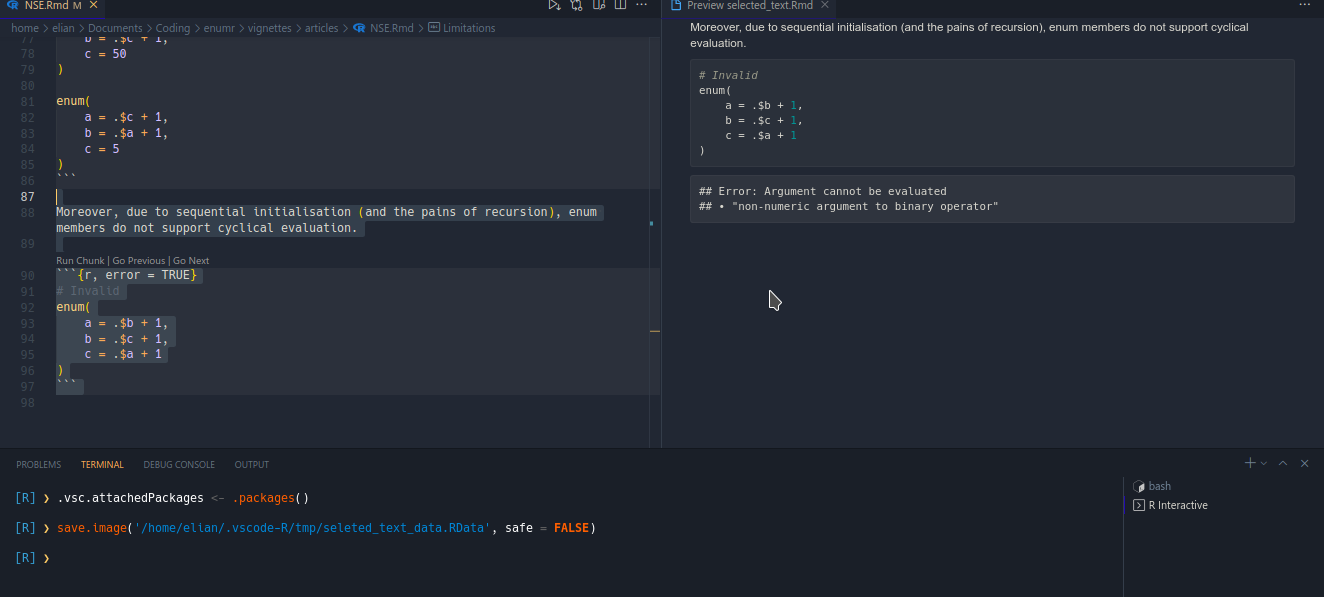
However, as can be seen in the terminal, it relies on saving the workspace to a .RData file for loading in the child process. I'm not super happy with having the user's terminal spammed like that, but I'm not sure of a way to avoid it...
renkun-ken commentedon Oct 25, 2021
Live Preview should be useful to serve HTML in WebView.
github-actions commentedon Oct 26, 2022
This issue is stale because it has been open for 365 days with no activity.
github-actions commentedon Nov 10, 2022
This issue was closed because it has been inactive for 14 days since being marked as stale.