Repository navigation
1.5 AOT by default performance tracking issue #8259

Description

Heya all,
When using Angular CLI 1.5 together with Angular 5.0.0, ng serve will default to using --aot=true. We added a new pipeline that should make AOT compilation much faster than it was with older CLI and Angular versions so we felt confident that AOT rebuild speeds should be much better.
Bigger projects can still have slow AOT rebuilds though. You can disable AOT by passing on the --no-aot (or --aot=false) flag, but if you have time I'd also like to ask for your help debugging remaining bottlenecks.
A good way to figure out how time is being spent in a rebuild is via CPU profiles. These show what functions are being called and how much time is being spent in each function.
This is how you can capture a CPU profile and share it here:
- Make sure your project is using the following dependencies:
- At least
@angular/cli@1.5.0-rc.8. - At least
@angular/core@5.0.0-rc.9, together with other@angular/*packages. - At least
rxjs@5.5.2. - Exactly
typescript@2.4.2, newer versions might work but this is the latest officially supported by@angular/compiler-cli.
- At least
- Open
chrome://inspect/#devicesin chrome, and then clickOpen dedicated DevTools for Node. This will give you a window calledDeveloper Tools - Node.jsthat we'll get back to in a second. - In your
package.json, add the following NPM script:"debug": "node--max_old_space_size=8192 --inspect --debug-brk ./node_modules/@angular/cli/bin/ng serve"- This script tells node to start Angular CLI with the node debugger, and also to raise the maximum memory limit.
- Run
npm run debug. - The
Open dedicated DevTools for Nodewindow should pop up. It is stopped on the very first line of Angular CLI. Click theResumebutton in the upper left corner of that window:

- Wait until the initial build is finalized.
- Open your apps
main.tsfile, addconsole.log(1);to the end of it and save. Do this 3 times.- Saving a file without code changes won't trigger trigger a real rebuild, we have to actually change code like adding a
console.log. - The first few rebuilds can take longer than others, so we ignore them.
- Saving a file without code changes won't trigger trigger a real rebuild, we have to actually change code like adding a
- Now we will capture the CPU profile of a rebuild:
- Go back to the
Open dedicated DevTools for Nodewindow. - Click the right-most tab, called
Profiler. - Click
Start. - Add another
console.log(1);tomain.tsand save it. - Wait until the rebuild finishes.
- Click the
Stopbutton in the profiler tab. - Wait until
Profile 1shows up on the left, and then click it (opening it can take some time for big projects).
- Go back to the
- You should see a chart. Zoom into it until you get all of it in the screen, take a screenshot and post it here.
-
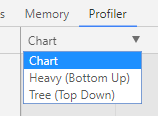
If you don't see a chart, click the dropdown beneath
Profilerand selectChartfrom there.
-
This is how it looks like for a new project:

-
- Right click
Profile 1, clickSave. Upload it somewhere and link it here.- I uploaded it to google drive: https://drive.google.com/open?id=0B06an8Bxmi7URXhhRzMxLWpPQmM
Then I can look at the CPU profile and see where time is being spent on your rebuild. Hopefully I can find new bottlenecks and make your builds faster.
Note: Sometimes the debugger doesn't disconnect after you quit the ng serve process. If you have to do this process more than once and get Unable to open devtools socket: address already in use when running npm run debug, open your process manager and kill any existing Node.js processes.
Activity
zeniale commentedon Oct 31, 2017
@filipesilva here is my screenshot:

and my .cpuprofile
https://drive.google.com/open?id=0B5sBny2Y-icKYlBEel9MTmJRejQ
Here is my config:
npm v5.4.2 and rxjs@5.5.2 Angular CLI: 1.5.0-rc.8 Node: 8.6.0 OS: win32 x64 Angular: 5.0.0-rc.9 animations, common, compiler, compiler-cli, core, forms http, platform-browser platform-browser-dynamic, router @angular/cli: 1.5.0-rc.8 @angular-devkit/build-optimizer: 0.0.31 @angular-devkit/core: 0.0.20 @angular-devkit/schematics: 0.0.34 @ngtools/json-schema: 1.1.0 @ngtools/webpack: 1.8.0-rc.8 @schematics/angular: 0.0.49 typescript: 2.4.2 webpack: 3.8.1filipesilva commentedon Oct 31, 2017
@zeniale thanks for pitching in. Yours is a bit different from the rest... it seems that half the time is spent on rebundling. Just to confirm, do you remember which rebuild number this was? The first 2 or 3 rebuilds could do this but I wouldn't expect the ones after that.
zeniale commentedon Oct 31, 2017
@filipesilva I followed your instructions, this is the fourth (4) rebuild
filipesilva commentedon Oct 31, 2017
Thanks for the confirmation. Then in yours I see around 33s used in AngularCompilerProgram and 20s in webpack rebundling, for a total of a 70s rebuild. Can you tell me how long are your
--no-aotrebuilds for comparison?intellix commentedon Oct 31, 2017
No AOT: 500-700ms
AOT: 5s
Profile: https://drive.google.com/open?id=0B-z04hg-_QmgTmloU0VNSzBZVkE
Screenshot:

Zoomed into a little bit of the smaller parts:

karptonite commentedon Oct 31, 2017
Is everyone counting rebuilds the same way? That is, does the first "build" count as a rebuild, or is it a rebuild only when after the first change?
filipesilva commentedon Oct 31, 2017
@karptonite following the instructions in the original post should yield a CPU profile for the fourth rebuild. Any rebuild after the second or third should be fine however.
filipesilva commentedon Oct 31, 2017
@intellix thanks for capturing that profile. Yours seems similar to most of the ones before: your rebuild time is composed around 3/4 of
AngularCompilerProgramwork and 1/4 of bundling. So far the only one to deviate was @zeniale's one, that seemed to be almost half one and half the other.zeniale commentedon Oct 31, 2017
@filipesilva If I launch --no-aot build, I get some errors like this:
This error in repeated for many modules. This seems to be this BUG (#8263) or this (#8066). This error is also present when launching
ng-testzeniale commentedon Oct 31, 2017
@filipesilva I get the error after compilation, I generate .cpuprofile file & screenshot for

--no-aotbuild anyway.Here is the screenshot:
Here is .cpuprofile file:
https://drive.google.com/open?id=0B5sBny2Y-icKWFJhSGlZUTFtR0E
P.S. Can you notify me on previous error solution?
filipesilva commentedon Oct 31, 2017
@zeniale I think the errors you're seeing are because that library (
@myFramework/fromework-ng2) wasn't packaged correctly and contains.tsfiles. There's more information about that problem here #8263.elvisbegovic commentedon Oct 31, 2017
@filipesilva
--no-aotis fast rebuilding, really appreciate and correct time BUT on browser loading page is very slow (4-5seconds for my case lazyloadmodules)I really want help you here and give you more infos from my project, how can I help to investigate? IMHO on more common project angular-cli 1.5.0 can't sell and activate aot by default
[-]1.5 performance tracking issue[/-][+]1.5 AOT by default performance tracking issue[/+]fix(@angular/cli): use JIT by default with ng5
filipesilva commentedon Oct 31, 2017
Heya all, we looked at the AOT rebuild times for large projects and decided to keep JIT by default with CLI 1.5 + Angular 5. We'll reassess for a future release but would not feel comfortable in changing the default to AOT in this version since it would be a bad experience for projects such as yours.
fix(@angular/cli): use JIT by default with ng5
elvisbegovic commentedon Oct 31, 2017
Thanks for inputs, thanks for your work but big damage! 😞
I was thinking AOT by default was the most wanted/waited feature in cli v1.5/ng v5
This breaking my heart :)
Does this mean we need wait ABC for cli v2 to have correct rebuild aot time in big project, or hopely in near future 1.5x ?
Do you have some advice on structure project in big project we need follow for aot?
@filipesilva
fix(@angular/cli): use JIT by default with ng5
hccampos commentedon Oct 31, 2017
Besides just trying to make AoT compilation faster, which is good, of course, why not try to come up with ways to make the compilation faster by avoiding certain patterns or using certain features in a different way.
For example, in the past it has been mentioned that using barrels could hurt performance. Is that still the case? Always or only when using
export * from './awesomepackage'How about path alises, do they hurt rebuild times?
And inline templates vs separate files? Inline styles vs scss files?
And what about having some output in the console with the number of modules contained in a chunk so we can more easily work towards having chunks with less modules (just looking at file size is tricky).
hansl commentedon Oct 31, 2017
Hi @istiti, @hccampos,
To answer your questions:
It's also breaking ours. We really pushed the limits of both compilers (
webpack,ngcandtsc) to be able to set AOT by default, and we fell short on large projects.Yes and no. We have a plan to remake the build system which will allow us to keep using webpack while also splitting your application in smaller pieces. When that's in, you should see shorter rebuild times (assuming you're following our best practices).
Not yet, but this is something we're working on.
It is still the case, but we helped webpack improve on this and they're still improving. We now build CommonJS in development which also fixes this issue completely (we want to go back to ES2015 modules but won't until performance improves).
In this case though, the performance itself comes from generating factories. The barrel is not a factor anymore, so times reported in this issue come mostly from
ngcitself.No. Path aliases are done by typescript, and report times of typescript itself (which is used in JIT) is minimal. Path aliases happen in both JIT and AOT.
This is where most of the time is being spent in
ngc. Big templates are definitely a problem, but it's unclear without actually investigating the issue where exactly the time is spent and if it can be helped.The real fix would be to have smaller applications, which will come in the new build system and ABC (when it's ready).
bmayen commentedon Nov 1, 2017
"It's also breaking ours. We really pushed the limits of both compilers (webpack, ngc and tsc) to be able to set AOT by default, and we fell short on large projects."
Valiant effort, guys! Thanks for all the hard work, as always.
theunreal commentedon Nov 1, 2017
Any temporary workaround?
hansl commentedon Nov 1, 2017
@theunreal You can still use
ng serve --aot, which is immensely faster than before (with ng5 and cli1.5).fix(@angular/cli): use JIT by default with ng5
danwulff commentedon Nov 1, 2017
@hansl @filipesilva With all this discussion on making aot default, I didn't see any info about running unit tests in aot. Will that be a possibility in the future? Will
ng testaot be made default likeng serveaot some day when compile time is better?diagramatics commentedon Nov 2, 2017
Here's one from me if it's still required. It's a pretty hefty project with a lot of work poured in it, and the profile is on Node v8.7.0 with the versions of Angular and the CLI noted above on a beefy Macbook Pro.
CPU-20171102T144702.cpuprofile.zip
hccampos commentedon Nov 2, 2017
Here is an interesting profile from our project, which takes 128 seconds on the 3rd rebuild while debugging. Almost 2 minutes are spent in
StyleCompiler._codegenStyleswhich means something is going very wrong there.Note that this was using Typescript 2.5.3 instead of the suggested 2.4.x. We are also using https://github.com/mseemann/angular2-mdl which might be introducing some hard to analyze/generate styles. Or maybe we are just doing something else in our codebase which the AoT compiler doesn't like.
CPU-20171102T091339.cpuprofile.zip
hccampos commentedon Nov 2, 2017
Since most of the time is spent on
replace, I am guessing something is triggering this http://www.regular-expressions.info/catastrophic.html I will dig deeper, but maybe someone on the Angular compiler team can figure it out quicker. @hansl @filipesilva should I open an issue on the Angular repo instead?fix(@angular/cli): use JIT by default with ng5
filipesilva commentedon Nov 2, 2017
@danwulff there's some discussion about AOT in unit tests on #8007
@diagramatics thanks for taking your CPU profile as well. I had a look at it and it looks very similar to the 'normal' time distribution: 3/4s on AOT, 1/4 on webpack. It's good to get confirmation of these samples 👍
@hccampos I pinged the compiler team about your issue.
pleerock commentedon Jan 10, 2018
@filipesilva looks like there is a confusion between
max-old-space-sizeandmax_old_space_size. I also usedmax-old-space-sizein debugging because I used code from your first post, you need to edit it. I made this found because of @sabeersulaiman post in #5618filipesilva commentedon Jan 10, 2018
@pleerock thanks for heads up, will edit it.
elvirdolic commentedon Apr 16, 2018
Will aot be default on ng serve as promised for v6?
elvisbegovic commentedon Apr 16, 2018
Where is it promised?! afaik it was for 1.5 but not interesting on large project. I heart for v6.x some things about it will come but still’ not default
You could take a look inside bazel from alexeagle repo or https://www.ng-conf.org/sessions/hands-full-stack-development-nx-bazel/
elvirdolic commentedon Apr 16, 2018
elvisbegovic commentedon Apr 16, 2018
Yes, if you read in this thread this comment it was by default one moment but deactivated again because in my project by example it is completly not interesting. check my comment here.
And last news you can read this comment
elvirdolic commentedon Apr 17, 2018
fix(@angular/cli): use JIT by default with ng5
angular-automatic-lock-bot commentedon Sep 8, 2019
This issue has been automatically locked due to inactivity.
Please file a new issue if you are encountering a similar or related problem.
Read more about our automatic conversation locking policy.
This action has been performed automatically by a bot.
fix(@angular/cli): use JIT by default with ng5