You signed in with another tab or window. Reload to refresh your session.You signed out in another tab or window. Reload to refresh your session.You switched accounts on another tab or window. Reload to refresh your session.Dismiss alert
{{ message }}
Repository navigation
Document what can cause NODE_MODULE_VERSION errors #1794
Here is my obversation:
It does not fail every time and every time it fails, there is no logs on server side. Every time it fails, plugins does not respond.
info  Using config file ~/.config/code-server/config.yaml
debug parsed command line {"args":{"_":[],"bind-addr":"0.0.0.0:8080","auth":"none","password":"325cf28c15008fd586c24a62"}}
debug spawned inner process 6128
debug parsed command line {"args":{"_":[],"log":"debug"}}
debug parsed command line {"args":{"_":[],"bind-addr":"0.0.0.0:8080","auth":"none","password":"325cf28c15008fd586c24a62"}}
debug wrapper 6109 received message from 6128 {"message":{"type":"handshake"}}
debug inner process 6128 received message from 6109 {"message":{"type":"handshake"}}
info  Using user-data-dir ~/.local/share/code-server
info  code-server 3.4.1 48f7c2724827e526eeaa6c2c151c520f48a61259
info  HTTP server listening on http://0.0.0.0:8080
info����- No authentication
info����- Not serving HTTPS
debug forking vs code...
debug got message from vs code {"message":{"type":"ready"}}
debug setting up vs code...
debug vscode got message from code-server {"message":{"type":"init","id":"UiPZ2rb60dd9u0XQc5CG7klY","options":{"args":{"_":[],"bind-addr":"0.0.0.0:8080","auth":"none","password":"325cf28c15008fd586c24a62","log":"debug","verbose":false,"config":"/home/shisoft/.config/code-server/config.yaml","user-data-dir":"/home/shisoft/.local/share/code-server","extensions-dir":"/home/shisoft/.local/share/code-server/extensions"},"remoteAuthority":"192.168.1.215:8080","startPath":{"url":"/home/shisoft/Code/bifrost","workspace":false}}}}
debug got message from vs code {"message":{"type":"options","id":"UiPZ2rb60dd9u0XQc5CG7klY","options":{"workbenchWebConfiguration":{"folderUri":{"$mid":1,"path":"/home/shisoft/Code/bifrost","scheme":"vscode-remote","authority":"192.168.1.215:8080"},"remoteAuthority":"192.168.1.215:8080","logLevel":1,"workspaceProvider":{"payload":[["userDataPath","/home/shisoft/.local/share/code-server"]]}},"remoteUserDataUri":{"$mid":1,"path":"/home/shisoft/.local/share/code-server","scheme":"vscode-remote","authority":"192.168.1.215:8080"},"productConfiguration":{"nameShort":"Code - OSS","nameLong":"Code - OSS","applicationName":"code-oss","dataFolderName":".vscode-oss","win32MutexName":"vscodeoss","licenseName":"MIT","licenseUrl":"https://github.com/Microsoft/vscode/blob/master/LICENSE.txt","win32DirName":"Microsoft Code OSS","win32NameVersion":"Microsoft Code OSS","win32RegValueName":"CodeOSS","win32AppId":"{{E34003BB-9E10-4501-8C11-BE3FAA83F23F}","win32x64AppId":"{{D77B7E06-80BA-4137-BCF4-654B95CCEBC5}","win32UserAppId":"{{C6065F05-9603-4FC4-8101-B9781A25D88E}","win32x64UserAppId":"{{C6065F05-9603-4FC4-8101-B9781A25D88E}","win32AppUserModelId":"Microsoft.CodeOSS","win32ShellNameShort":"C&ode - OSS","darwinBundleIdentifier":"com.visualstudio.code.oss","linuxIconName":"com.visualstudio.code.oss","licenseFileName":"LICENSE.txt","reportIssueUrl":"https://github.com/cdr/code-server/issues/new","urlProtocol":"code-oss","extensionAllowedProposedApi":["ms-vscode.vscode-js-profile-table","ms-vscode.references-view"],"builtInExtensions":[{"name":"ms-vscode.node-debug","version":"1.44.5","repo":"https://github.com/Microsoft/vscode-node-debug","metadata":{"id":"b6ded8fb-a0a0-4c1c-acbd-ab2a3bc995a6","publisherId":{"publisherId":"5f5636e7-69ed-4afe-b5d6-8d231fb3d3ee","publisherName":"ms-vscode","displayName":"Microsoft","flags":"verified"},"publisherDisplayName":"Microsoft"}},{"name":"ms-vscode.node-debug2","version":"1.42.2","repo":"https://github.com/Microsoft/vscode-node-debug2","metadata":{"id":"36d19e17-7569-4841-a001-947eb18602b2","publisherId":{"publisherId":"5f5636e7-69ed-4afe-b5d6-8d231fb3d3ee","publisherName":"ms-vscode","displayName":"Microsoft","flags":"verified"},"publisherDisplayName":"Microsoft"}},{"name":"ms-vscode.references-view","version":"0.0.51","repo":"https://github.com/Microsoft/vscode-reference-view","metadata":{"id":"dc489f46-520d-4556-ae85-1f9eab3c412d","publisherId":{"publisherId":"5f5636e7-69ed-4afe-b5d6-8d231fb3d3ee","publisherName":"ms-vscode","displayName":"Microsoft","flags":"verified"},"publisherDisplayName":"Microsoft"}},{"name":"ms-vscode.js-debug-companion","version":"1.0.0","repo":"https://github.com/microsoft/vscode-js-debug-companion","metadata":{"id":"99cb0b7f-7354-4278-b8da-6cc79972169d","publisherId":{"publisherId":"5f5636e7-69ed-4afe-b5d6-8d231fb3d3ee","publisherName":"ms-vscode","displayName":"Microsoft","flags":"verified"},"publisherDisplayName":"Microsoft"}},{"name":"ms-vscode.js-debug-nightly","version":"2020.4.2917","repo":"https://github.com/Microsoft/vscode-js-debug","metadata":{"id":"7acbb4ce-c85a-49d4-8d95-a8054406ae97","publisherId":{"publisherId":"5f5636e7-69ed-4afe-b5d6-8d231fb3d3ee","publisherName":"ms-vscode","displayName":"Microsoft","flags":"verified"},"publisherDisplayName":"Microsoft"}},{"name":"ms-vscode.vscode-js-profile-table","version":"0.0.2","repo":"https://github.com/Microsoft/vscode-js-debug","metadata":{"id":"7e52b41b-71ad-457b-ab7e-0620f1fc4feb","publisherId":{"publisherId":"5f5636e7-69ed-4afe-b5d6-8d231fb3d3ee","publisherName":"ms-vscode","displayName":"Microsoft","flags":"verified"},"publisherDisplayName":"Microsoft"}}],"commit":"48f7c2724827e526eeaa6c2c151c520f48a61259","date":"2020-06-04T10:39:14Z","version":"1.45.1","extensionsGallery":{"serviceUrl":"https://extensions.coder.com/api","itemUrl":"","controlUrl":"","recommendationsUrl":""}},"nlsConfiguration":{"locale":"en","availableLanguages":{}},"commit":"48f7c2724827e526eeaa6c2c151c520f48a61259"}}}
debug vscode got message from code-server {"message":{"type":"socket","query":{"type":"Management","reconnectionToken":"3ff95085-7351-4b3f-b172-f0f8ea3a7524","reconnection":"false","skipWebSocketFrames":"false"}}}
debug vscode got message from code-server {"message":{"type":"socket","query":{"type":"ExtensionHost","reconnectionToken":"adf5f796-2325-4c94-aa1d-6d4be17daa6d","reconnection":"false","skipWebSocketFrames":"false"}}}
I managed to get my installation working. I re-installed Xcode-cli tools and had to do an npm rebuild on the vscode folder. I'm not sure which of these led to the fix but I'm not getting the error anymore. The error I was getting before the nom rebuild was:
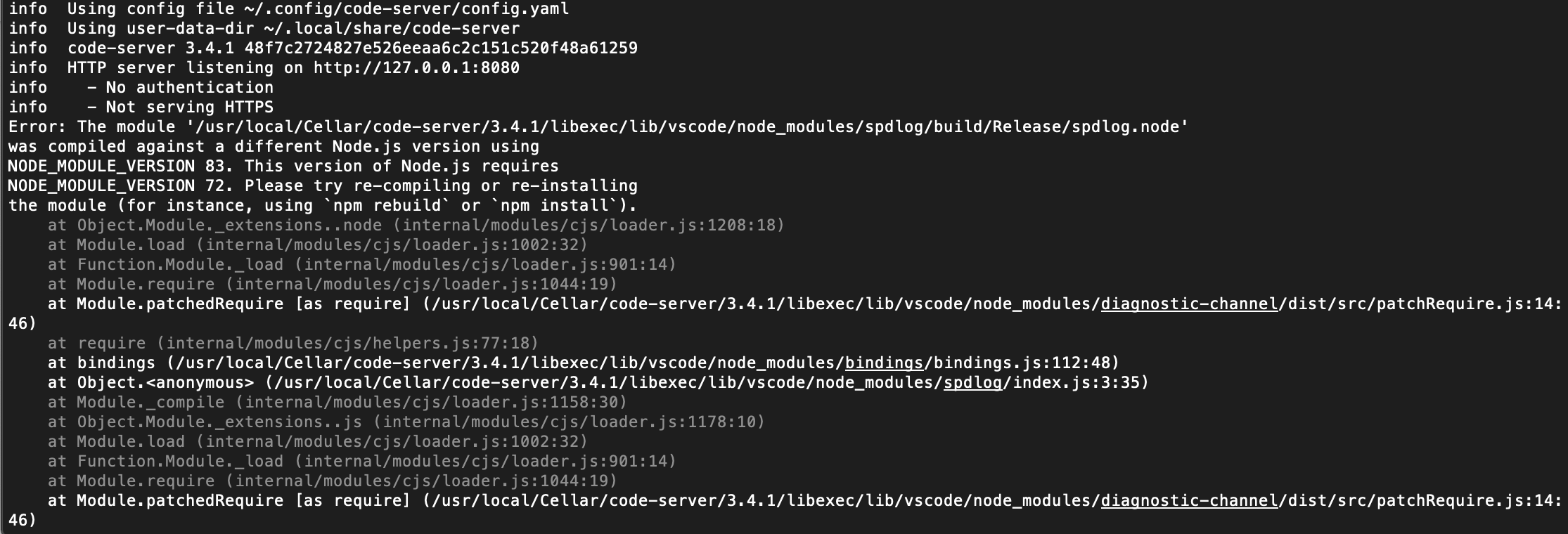
Error: The module '/usr/local/Cellar/code-server/3.4.1/libexec/lib/vscode/node_modules/spdlog/build/Release/spdlog.node'
was compiled against a different Node.js version using
NODE_MODULE_VERSION 83. This version of Node.js requires
NODE_MODULE_VERSION 72. Please try re-compiling or re-installing
the module (for instance, using npm rebuild or npm install).
Very weird, I just installed v3.4.1 from brew and it works fine for me. That error indicates your node is out of date but if you installed from homebrew it should be using the latest unless you pinned it yourself.
It always happens to me after I did a fresh installation. I can work normally for the first time after I run the install script. But as soon as I reload once this error keeps happening until I run the install script again...
@nhooyr happens to me as well. In my case, it is caused by NVM usage. Latest node 12 LTS installed via nvm and used by default in system and node 14 installed via brew. Looks like code-server also uses node from NVM.
The only working solution for me is usage of standalone release. But macOS asked about 5 times for permission because of untrusted developer (binary version of nodejs and so on).
I'm getting same problem as esmondmissen - but reinstall of xcode clt didn't fix. I did npm rebuild, but didn't know where vs code folder is. Still have error ( see screenshot ). I'm on macOS Mojave
On Jul 1, 2021, at 6:37 PM, Joe Previte ***@***.***> wrote:
Closed #1794 via #3706.
—
You are receiving this because you are subscribed to this thread.
Reply to this email directly, view it on GitHub, or unsubscribe.


Activity
esmondmissen commentedon Jun 11, 2020
I am having the same experience with the following error in the console: Extension host terminated unexpectedly. Code: – 0 – " Signal: " – null
shisoft commentedon Jun 11, 2020
Having the same problem in ARM64, x86 is all fine
nhooyr commentedon Jun 11, 2020
Should be fixed in the latest release.
Please upgrade!
https://github.com/cdr/code-server/releases/tag/v3.4.1
shisoft commentedon Jun 11, 2020
Problems remains in 3.4.1
nhooyr commentedon Jun 11, 2020
Try verbose logging: https://github.com/cdr/code-server/blob/master/doc/FAQ.md#how-do-i-debug-issues-with-code-server
shisoft commentedon Jun 11, 2020
Here is my obversation:
It does not fail every time and every time it fails, there is no logs on server side. Every time it fails, plugins does not respond.
esmondmissen commentedon Jun 12, 2020
I managed to get my installation working. I re-installed Xcode-cli tools and had to do an npm rebuild on the vscode folder. I'm not sure which of these led to the fix but I'm not getting the error anymore. The error I was getting before the nom rebuild was:
Error: The module '/usr/local/Cellar/code-server/3.4.1/libexec/lib/vscode/node_modules/spdlog/build/Release/spdlog.node'
was compiled against a different Node.js version using
NODE_MODULE_VERSION 83. This version of Node.js requires
NODE_MODULE_VERSION 72. Please try re-compiling or re-installing
the module (for instance, using
npm rebuildornpm install).nhooyr commentedon Jun 12, 2020
Very weird, I just installed
v3.4.1from brew and it works fine for me. That error indicates your node is out of date but if you installed from homebrew it should be using the latest unless you pinned it yourself.flolanger commentedon Jun 12, 2020
It always happens to me after I did a fresh installation. I can work normally for the first time after I run the install script. But as soon as I reload once this error keeps happening until I run the install script again...
nhooyr commentedon Jun 13, 2020
@flolanger you're on macOS as well?
storm2513 commentedon Jun 19, 2020
@nhooyr happens to me as well. In my case, it is caused by NVM usage. Latest node 12 LTS installed via nvm and used by default in system and node 14 installed via brew. Looks like code-server also uses node from NVM.
The only working solution for me is usage of standalone release. But macOS asked about 5 times for permission because of untrusted developer (binary version of nodejs and so on).
sharkymark commentedon Jun 20, 2020
I'm getting same problem as esmondmissen - but reinstall of xcode clt didn't fix. I did npm rebuild, but didn't know where vs code folder is. Still have error ( see screenshot ). I'm on macOS Mojave
nhooyr commentedon Jun 22, 2020
@mtm20176 How are you running and using code-server?
11 remaining items
cangetright commentedon Jul 2, 2021