Repository navigation
How can I debug (C / C++)? #3643
Description

OS/Web Information
- Web Browser: Chrome 91.0.4472.101(正式版本) (32 位)
- Local OS:Windows 10
- Remote OS:CentOS Linux release 7.6.1810 (Core)
- Remote Architecture: docker and port in 8086
code-server --version: 3.10.2 387b12e
Steps to Reproduce
- intall extension and create main.c
#include <stdio.h>
void main(){

int x=20;

    printf("XLJ666\n");

}
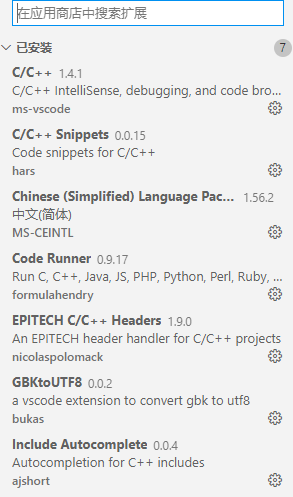
3.config launch.json
{
    // 使用 IntelliSense 了解相关属性。
    // 悬停以查看现有属性的描述。
    // 欲了解更多信息,请访问: https://go.microsoft.com/fwlink/?linkid=830387
    "version": "0.2.0",
    "configurations": [
        {
            "name": "启动调试",
            "type": "cppdbg",
            "request": "launch",
            "program": "${fileDirname}/bin/${fileBasenameNoExtension}.debug.out -g",//该项填写生成的可执行文件的实际路径,注意后缀名
            "preLaunchTask": "build",
            "args": [],
            "stopAtEntry": false,
            "cwd": "${fileDirname}",
            "environment": [],
            "externalConsole": false,
            "MIMode": "gdb",
            "setupCommands": [
                {
                    "description": "为 gdb 启用整齐打印",
                    "text": "-enable-pretty-printing",
                    "ignoreFailures": true
                }
            ]
        }
    ]
}
3.config task.json
{
    // See https://go.microsoft.com/fwlink/?LinkId=733558
    // for the documentation about the tasks.json format
    "version": "2.0.0",
    "tasks": [
        {

            "type": "shell",
            "label": "build",
            "command": "gcc ${file} -o ${fileDirname}/bin/${fileBasenameNoExtension}.debug.out -g"
        }
    ]
}
Expected
should print in terminal and print
XLJ666
应该在终端里面打印出 XLJ666
Actual
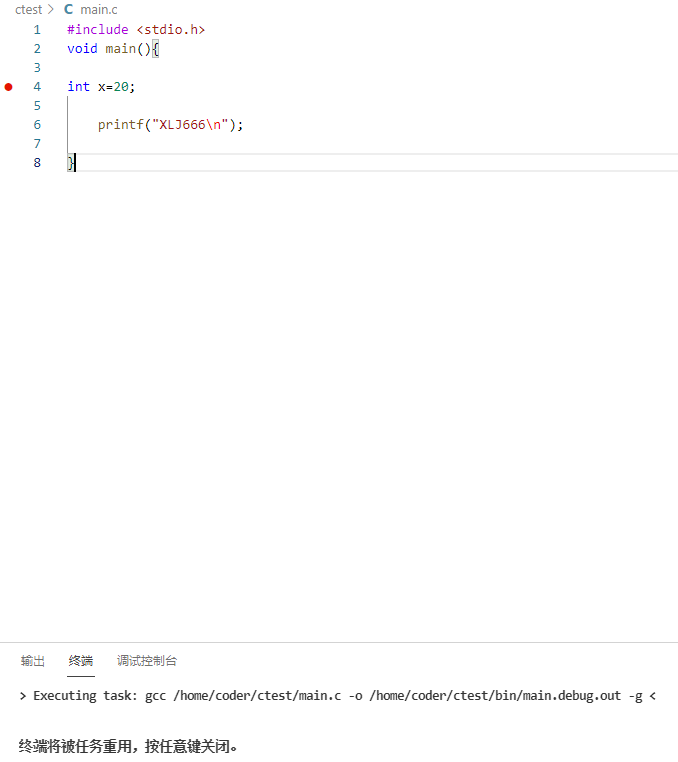
actually , when i press F5 it flash and doesn't work, just run command in task.json ,cmd in launch.json
"program": "${fileDirname}/bin/${fileBasenameNoExtension}.debug.out -g" doesn't work
实际上,我调试按F5他一闪而过,并没有打印信息,只是执行了task.json中的command,而launch.json 中的program命令根本没有执行。
Logs
nothing!
Screenshot
Notes
This issue can be reproduced in VS Code: No,i try it in vscode(ubuntu 18),it works
在ubuntu 18中安装vscode 是可以调试的。
Activity
jsjoeio commentedon Jun 21, 2021
Is this a duplicate of #1616?
XLJ-CN commentedon Jun 22, 2021
yes!
by the way ,the problem seems like debugger program does
n execute the laugch.jsons program .Just like when you build it manual but don`t run command [./main.out]
Please let me know if you need anything else.
是的,跟这个bug类似
顺便说下,这个问题看起来就是调试器没有执行laugch.json里面的program行参数
就像当你手动编译了程序之后但是没执行./main.out命令
如果还需要什么其他bug信息,请告诉我
repo-ranger commentedon Jun 22, 2021
jsjoeio commentedon Jun 22, 2021
Thanks @XLJ-CN! We'll close this issue and track in the other one. Thanks for the repro steps!