Repository navigation
The workbench failed to connect to the server (Error: WebSocket close with status code 1006) #4443
Description

OS/Web Information
- Web Browser: Chromium (brave), although I also tested with Firefox and Edge and got the same result.
- Local OS: Windows 11
- Remote OS: Ubuntu
- Remote Architecture: x86-64
code-server --version: 3.12.0
Steps to Reproduce
- Ran code-server (i also tried using --proxy-domain to see if I got any different results.) I used nginx to reverse proxy to my domain, I also use Cloudflare.
- When I open the domain on my browser, I get
The workbench failed to connect to the server (Error: WebSocket close with status code 1006)
Expected
The server would work normally.
Actual
See error above.
Logs
Logs look normal for the remote server, however browser gives error:
[vscode] failed to initialize VS Code vscode.browserified.js:726:13
    [4]< <domain>/static/b37ff28a0a582aee84a8f961755d0cb40a4081db/usr/lib/code-server/out/browser/pages/vscode.browserified.js:726
    o <domain>/static/b37ff28a0a582aee84a8f961755d0cb40a4081db/usr/lib/code-server/out/browser/pages/vscode.browserified.js:1
    r <domain>/static/b37ff28a0a582aee84a8f961755d0cb40a4081db/usr/lib/code-server/out/browser/pages/vscode.browserified.js:1
    <anonymous> <domain>/static/b37ff28a0a582aee84a8f961755d0cb40a4081db/usr/lib/code-server/out/browser/pages/vscode.browserified.js:1
(I replaced my domain with for privacy reasons.)
Error: [vscode] Could not set body background to theme background color. Could not find colorThemeData in localStorage.
    setBodyBackgroundToThemeBackgroundColor <domain>/static/b37ff28a0a582aee84a8f961755d0cb40a4081db/usr/lib/code-server/out/browser/pages/vscode.browserified.js:668
    main <domain>/static/b37ff28a0a582aee84a8f961755d0cb40a4081db/usr/lib/code-server/out/browser/pages/vscode.browserified.js:719
    [4]< <domain>/static/b37ff28a0a582aee84a8f961755d0cb40a4081db/usr/lib/code-server/out/browser/pages/vscode.browserified.js:723
    o <domain>/static/b37ff28a0a582aee84a8f961755d0cb40a4081db/usr/lib/code-server/out/browser/pages/vscode.browserified.js:1
    r <domain>/static/b37ff28a0a582aee84a8f961755d0cb40a4081db/usr/lib/code-server/out/browser/pages/vscode.browserified.js:1
    <anonymous> <domain>/static/b37ff28a0a582aee84a8f961755d0cb40a4081db/usr/lib/code-server/out/browser/pages/vscode.browserified.js:1
vscode.browserified.js:727:13
    [4]< <domain>/static/b37ff28a0a582aee84a8f961755d0cb40a4081db/usr/lib/code-server/out/browser/pages/vscode.browserified.js:727
    o <domain>/static/b37ff28a0a582aee84a8f961755d0cb40a4081db/usr/lib/code-server/out/browser/pages/vscode.browserified.js:1
    r <domain>/static/b37ff28a0a582aee84a8f961755d0cb40a4081db/usr/lib/code-server/out/browser/pages/vscode.browserified.js:1
    <anonymous> <domain>/static/b37ff28a0a582aee84a8f961755d0cb40a4081db/usr/lib/code-server/out/browser/pages/vscode.browserified.js:1
Screenshot

Notes
This issue can be reproduced in VS Code: No
Activity
woshilaiba commentedon Nov 4, 2021
i got this too. i ran it in docker.
i found there must be lines below in the nginx.conf to make it work
location / {
proxy_pass http://codeserver.xxx.xxx:8443/;
proxy_set_header Host $host;
proxy_set_header Upgrade $http_upgrade;
proxy_set_header Connection upgrade;
proxy_set_header Accept-Encoding gzip;
}
this is from
https://github.com/cdr/code-server/blob/main/docs/guide.md#using-lets-encrypt-with-nginx
ChrisKimZHT commentedon Nov 4, 2021
proxy_set_header Upgrade $http_upgrade;
proxy_set_header Connection upgrade;
proxy_set_header Accept-Encoding gzip;
isolume commentedon Nov 4, 2021
Thanks, that seemed to work.
bobbywaz commentedon Nov 13, 2021
Any idea which version broke this? I can't get it to work with Nginx-Proxy-Manager so I'll just downgrade until code-server gets it's sh*t together.
jsjoeio commentedon Nov 15, 2021
cc @code-asher
code-asher commentedon Nov 16, 2021
Those headers enable proxying websockets so it is not a code-server issue as far as I can tell.
bsmithio commentedon Nov 29, 2021
If anyone is looking for a solution for ingress-nginx on Kubernetes like I was, add this annotation to your ingress
nginx.org/websocket-services: "code-server"
Replace code-server with whatever your code-server service name is.
ZandercraftGames commentedon Feb 6, 2022
A little late now, but does anyone have a working configuration for Apache2?
tinuh commentedon Feb 26, 2022
Hey looking for the same thing, having issues proxying code server in apache2
AuthorShin commentedon Mar 25, 2022
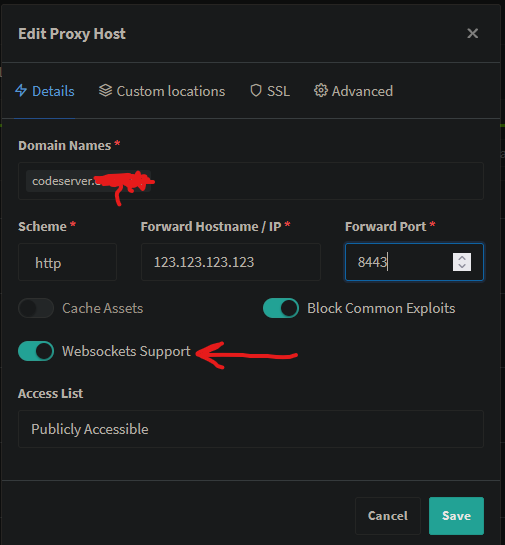
When adding the domain or subdomain for code-server on Nginx Proxy Manager make sure to check the Websockets support to solve the problem.
leuit commentedon Apr 21, 2022
@tinuh @ZandercraftGames
For those having issues with reverse proxy in Apache, refer to #4723 (comment)
I hope this works for you!
1m188 commentedon Apr 26, 2022
A little late now, but does anyone have a working configuration for caddy2?
bravo-wd commentedon Jun 8, 2022
Thank you very much. It's very useful to me.
getkub commentedon Jun 12, 2022
for kubernetes, I had to add BOTH suggestions from Link1 and annotations as follows.
PS: the {{ .Values.user }} etc, are dynamic values from values.yml of helm chart which you need to replace
Entire example below using helm chart
20 remaining items
EITSxiaozhai commentedon Jan 1, 2024
This config file worked for me. Solved the websock error. Thanks a lot!
code-server ---> nginx
octopus2181 commentedon Jan 31, 2024
Hi, I found an issue where if I set the port to 443:443 in the docker compose of Nginx-Proxy-Manager ,reverse proxies are good. I was able to use code-server in the docker . But If I set a different port mapping 443 in the docker compose of Nginx-Proxy-Manager (such as 9091:443), I can't use linuxserver/code-server . There is an error, "The workbench failed to connect to the server (Error: WebSocket close with status code 1006)" . Because my port 443 is forbidden, I want to use a different port.
code-asher commentedon Feb 1, 2024
@octopus2181 Could you open a new issue with a Docker compose I can use to reproduce the issue? I will look into it.
keskinonur commentedon Feb 4, 2024
For you referece, with code-server version 4.20.1, my working nginx configuration is:
octopus2181 commentedon Feb 9, 2024
Yes, you are right ! Setting proxy_set_header X-Forwarded-Host $http_host , the port 9091 can connect to the code-server .
Thank you !
hogdanish commentedon Feb 13, 2024
Since nearly every solution on this issue refers to non-standard networking configurations without elaborating on what they're supposed to indicate, here's the configuration that worked for my specific local environment (NGINX Proxy Manager + lscr.io's code-server image in separate docker stacks sharing the same 'proxy' bridge network):
8443on the lscr.io image)192.168.4.58and80with the IP and port that NGINX Proxy Manager is accessible through on your server.This configuration uses the default ports that both code-server and NGINX Proxy Manager use out-of-the-box, at least while using lscr.io's code-server image- but it should still work either way.
If you run into any issues after this point, ensure you haven't incorrectly modified any of code-server's proxy-related environment variables (i.e, CS_DISABLE_PROXY or PROXY_DOMAIN), and ensure that you correctly configured your domain's DNS settings through your DNS provider if applicable (i.e, an A record pointing *.yourdomain.com to your server's IP or tunnel configuration).
Here's what my final docker-compose.yml file looked like (environment variables redacted):
Full disclaimer that I have no idea if I'm following the best practices here, I'm just posting what worked for my very specific configuration. Feel free to correct me if there's a better way to go about any of this.
wangyizhi1 commentedon May 15, 2024
@code-asher 's answer works for me, and a faster way:
freeluo22 commentedon May 22, 2024
This configuration works for me.
Venjy commentedon May 24, 2024
This works for me. I've tried lots of configuration, the key line is
proxy_set_header X-Forwarded-Host $host:$server_port;yifanlu0227 commentedon May 29, 2024
@wangyizhi1 Awesome, this works!
Update default nginx config in guide.md (coder#6471)
kimboslice99 commentedon Feb 6, 2025
For those that may be needing to proxy through IIS, here is a couple rewrite rules for that. This app uses permessage-deflate which ARR does not support, so the request fails with this 1006 error message
HelloMihai commentedon Apr 3, 2025
where is the
nginx.conffile?console into the nginx container
vector090 commentedon Jun 25, 2025
Worked like a charm.
Indeed the key line is proxy_set_header X-Forwarded-Host $host:$server_port;
starseaheart commentedon Jan 6, 2026
This is particularly important for those who access other programs on the server through the proxy + nginx, and these programs only listen on the port of 127.0.0.1.