Repository navigation
Possible memory leak related to lldb-mi #10176
Description

Environment
- OS and version: macOS Ventura 13.0.1 (22A400)
- VS Code:
- Version: 1.73.1
- Commit: 6261075646f055b99068d3688932416f2346dd3b
- Date: 2022-11-09T02:22:48.959Z
- Electron: 19.0.17
- Chromium: 102.0.5005.167
- Node.js: 16.14.2
- V8: 10.2.154.15-electron.0
- OS: Darwin arm64 22.1.0
- Sandboxed: No
- C/C++ extension: v1.12.4
- GDB / LLDB version: lldb-1400.0.38.13, Apple Swift version 5.7.1 (swiftlang-5.7.1.135.3 clang-1400.0.29.51)
Bug Summary and Steps to Reproduce
Bug Summary:
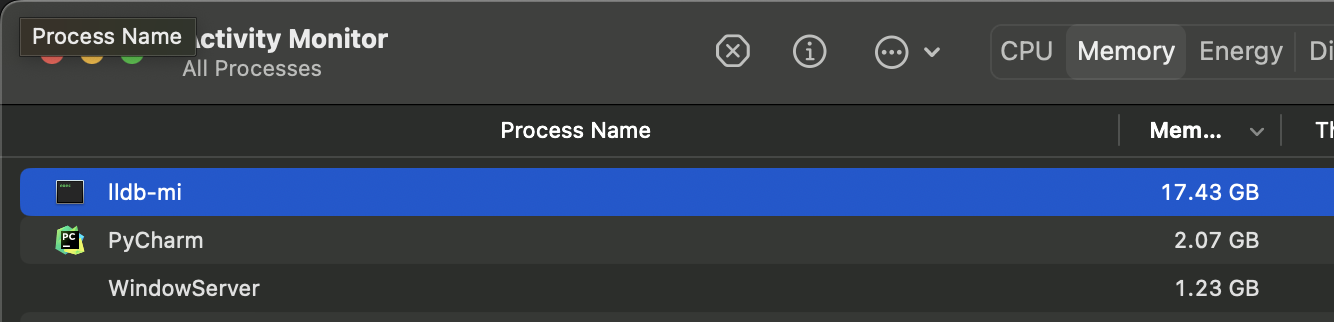
lldb-mi kept eating memory (about +500MB/s) when debugging until the whole macOS froze.
Steps to reproduce:
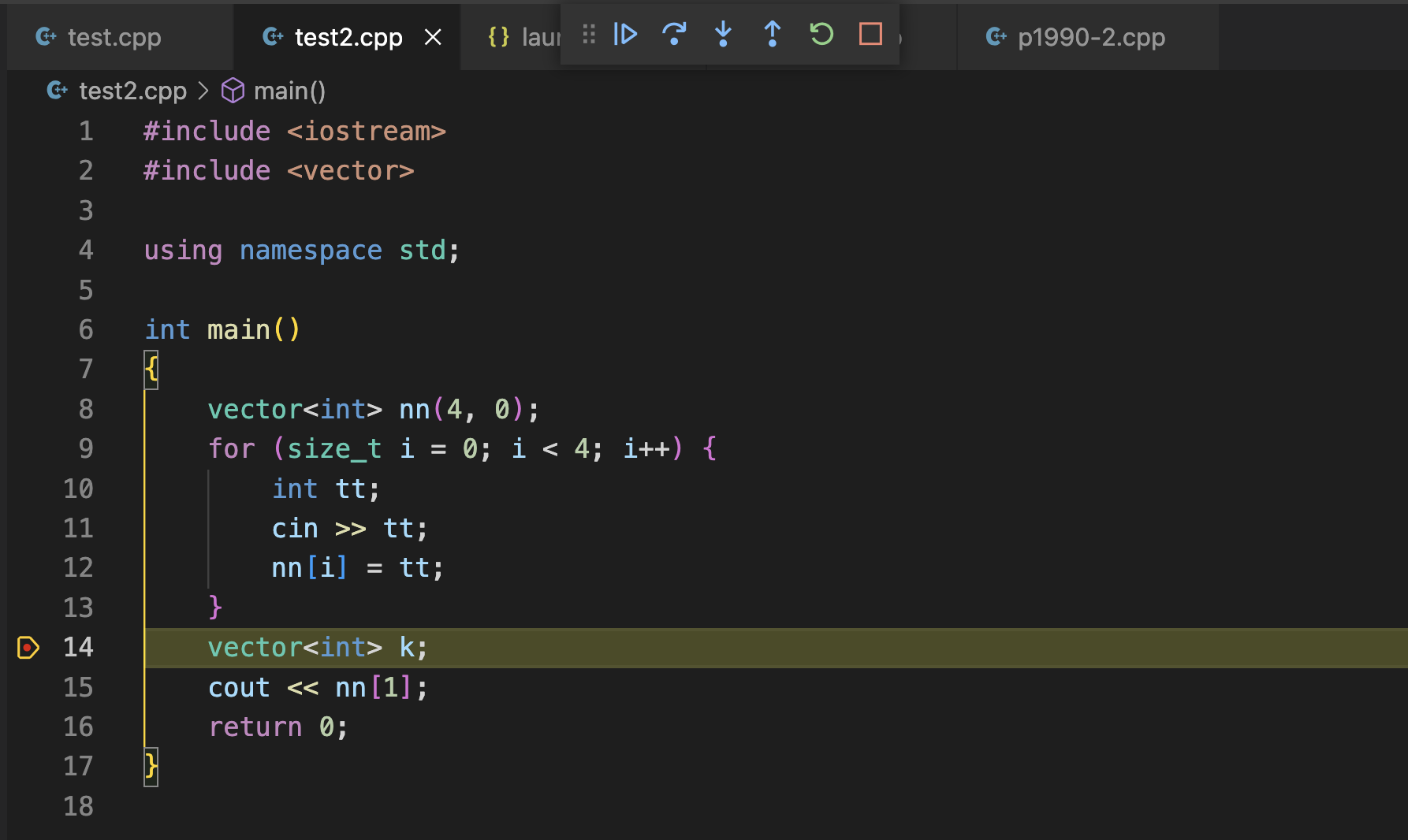
- Debug the following snippet with the provided environment above
#include <iostream>
#include <vector>

using namespace std;

int main()
{
    vector<int> nn(4, 0);
    for (size_t i = 0; i < 4; i++) {
        int tt;
        cin >> tt;
        nn[i] = tt;
    }
    vector<int> k;
    cout << nn[1];
    return 0;
}
- With the config(launch/task) provided below
- Make a break point at
line 14: vector<int> k; - Start debugging
- Input 4 integers
5 2 6 1, press enter, then be like this
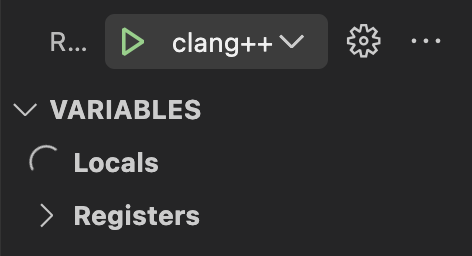
- Variables monitor will show nothing but loading...
- Open
Activity Monitor(macOS app),lldb-mistart using lots of memory
- Stop debugging, close the terminal windows,
lldb-mistill won't stop and keep eating memory - Can stop
lldb-mionly by force quit.
Debugger Configurations
{
    "configurations": [
        {
            "name": "clang++ dbg",
            "type": "cppdbg",
            "request": "launch",
            "program": "${fileDirname}/${fileBasenameNoExtension}",
            "args": [],
            "stopAtEntry": false,
            "cwd": "${fileDirname}",
            "environment": [],
            "externalConsole": true,
            "MIMode": "lldb",
            "preLaunchTask": "C/C++: clang++ build active file",
            "logging": { "engineLogging": true, "trace": true, "traceResponse": true }
        }
    ],
    "version": "2.0.0"
}

{
    "tasks": [
        {
            "type": "cppbuild",
            "label": "C/C++: clang++ build active file",
            "command": "/usr/bin/clang++",
            "args": [
                "-fdiagnostics-color=always",
                "-g",
                "${file}",
                "-o",
                "${fileDirname}/${fileBasenameNoExtension}"
            ],
            "options": {
                "cwd": "${fileDirname}"
            },
            "problemMatcher": [
                "$gcc"
            ],
            "group": "build",
            "detail": "Task generated by Debugger."
        }
    ],
    "version": "2.0.0"
}
Debugger Logs
https://blog.hackroid.com/debug-log.htmlOther Extensions
No response
Additional Information
No response
Activity
[-]Possible memory leak related to lldb-mi[/-][+]Possible memory leak related to `lldb-mi`[/+]hackroid commentedon Nov 21, 2022
Small changes to the code will avoid the problem, but, just wondering why.
Like:
line 10: move
int tt;outside the for loop.Or like:
line 9: change
size_ttoint.H-G-Hristov commentedon Nov 22, 2022
It's broken. I switched to CodeLLDB for debugging on macOS.
#9831
bobbrow commentedon Nov 23, 2022
Andrew Wang (@WardenGnaw) have you seen this?
WardenGnaw commentedon Nov 28, 2022
Yeah, this is due to the external dependency the debugger uses
lldb-mi.zanmato1984 commentedon Mar 30, 2023
Observed the exact same issue, i.e., local variable keep loading, lldb-mi showing significant memory consumption after a while.
OS
macOS Ventura Version 13.2.1 (22D68)
VSCode
Version: 1.76.2
Commit: ee2b180d582a7f601fa6ecfdad8d9fd269ab1884
Date: 2023-03-14T17:53:46.528Z
Electron: 19.1.11
Chromium: 102.0.5005.196
Node.js: 16.14.2
V8: 10.2.154.26-electron.0
OS: Darwin arm64 22.3.0
Sandboxed: No
zanmato1984 commentedon Mar 30, 2023
This works for me too. Thanks bro!
denniskb commentedon Jul 27, 2024
Same issue when trying to step through a googletest test case that involves
popen(). Stepping through any other code is smooth and leak-free.feiyehua commentedon Nov 25, 2024
macOS 15.2 Beta (24C5089c),
Version: 1.95.3 (Universal)
Commit: f1a4fb101478ce6ec82fe9627c43efbf9e98c813
Date: 2024-11-13T14:50:04.152Z (1 wk ago)
Electron: 32.2.1
ElectronBuildId: 10427718
Chromium: 128.0.6613.186
Node.js: 20.18.0
V8: 12.8.374.38-electron.0
OS: Darwin arm64 24.2.0
Same problem
80G of memory is crazy, luckily it won't completely froze my system thanks to swap