Repository navigation
Intellisense issues with KEIL extensions #3222
Description

Hello
I am running VSCODE with the c/c++ extension by Microsoft.
I have configured the extensions c_cpp_properties.json correctly.
I can jump to definitions of any symbols in the opened folder correctly.
Yet the auto-completion is not working, nor the function suggestions (e.g. arguments)
When I start typing a variable name, a project level menu list is showed (literally every symbol in the entire project).
Additionally, structures/unions members have not suggested upon typing [. or ->) symbols.
Is something misconfigured, or is this bug/unimplemented behavior?
Thanks.
Activity
bobbrow commentedon Feb 26, 2019
Do you see any "problems" in the problems window? When this happens (getting every symbol in the project), it is usually because a
#includestatement didn't resolve. You can try setting"C_Cpp.intelliSenseEngineFallback": "Disabled"to turn off this behavior. We plan to disable this by default in the future due to the confusion it generally causes.zoharshemesh commentedon Feb 27, 2019
Hello,
Thanks for your response.
I am an embedded RT team leader developing mostly in C language.
We are using KEIL uVision but would like to use a different more language-awareness editor. I have bought SlickEdit editor, which works perfectly by simply open SlickEdit project (@ KEIL workspace location). SlickEdit detects the projects symbols, functions, tooltip, structures members etc. perfectly (without any additional user involvement).
We have many problems getting the same results using VSCode.
VSCode detects all project (and workspace) functions, structures, members (F12, goto definitions is working perfectly), but fails to 'connect' the members to the structures (e.g. by CTRL+SPACE, or . or ->), nighter it hints about the function arguments (again although it detects the function location and definition).
I would like to use VSCode and drop SlickEdit depend (maintenance, updates etc.)
I have surfed and read every forum related to the subject, but unable to find any (easy) solution.
I still didn't give up yet :)
Yours,
Zohar Shemesh
bobbrow commentedon Feb 27, 2019
This is what I mean:
Check the Problems window and see if you have something like
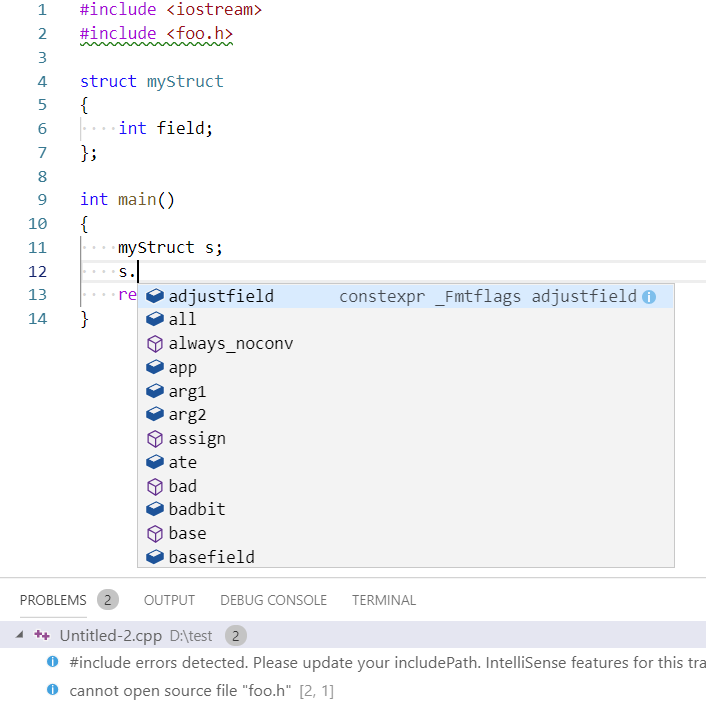
"#include errors detected". If this is the case, you might be seeing the wrong member list for structs/classes/etc.If this is the case, move the cursor to the green squiggled

#include, click the lightbulb and update your include path or choose "force semantic IntelliSense" if you don't want to configure it right now:If you choose to ignore the error and force semantic IntelliSense, then the member list will look like what you expect:

Also, we don't natively support Keil intrinsics and keywords. You will have to workaround this problem by adding them to the
c_cpp_properties.jsonfile in the"defines"array and assigning them to nothing so that our compiler skips over them. For example:zoharshemesh commentedon Feb 27, 2019
bobbrow commentedon Feb 27, 2019
Sorry, the image did not appear. Can you try again?
zoharshemesh commentedon Feb 27, 2019
bobbrow commentedon Feb 27, 2019
I think you'll need to add it through the web interface. Replying to the email notification with an image is not working (and it's posting your personal information online... I deleted it for you).
zoharshemesh commentedon Feb 27, 2019
zoharshemesh commentedon Feb 27, 2019
bobbrow commentedon Feb 27, 2019
There could be an error somewhere that is causing the variable not to be defined. If you hover the mouse over
TaskTimersdo you get a tooltip with information about the variable?zoharshemesh commentedon Feb 27, 2019
No, I get:
"<error-type> TaskTimers"bobbrow commentedon Feb 27, 2019
Can you go to the declaration of TaskTimers and see if there is an error squiggle nearby?
Just a reminder that we don't support Keil keywords, so it's highly possible our compiler is getting confused by them and skipping over some variable declarations during its error recovery.
zoharshemesh commentedon Feb 27, 2019
Hi,

This is no KEIL related, the TaskTimers is TMR_ST simple structure:
17 remaining items
github-actions commentedon Oct 17, 2020
This feature request is being closed due to insufficient upvotes. When enough upvotes are received, this issue will be eligible for our backlog.
denis-shienkov commentedon Dec 30, 2020
Hi guys, it would be good to have the support not only for the Keil toolchain, but also for the:
github-actions commentedon Jan 26, 2021
This feature request has received enough votes to be added to our backlog.
wsytlzdh commentedon Dec 22, 2021
there are many embeded developer /project using c/c++. so that will be great to support this. and anybody can tell me is there any milestone? thanks