Repository navigation
The behavior of VS Code's "files.autoGuessEncoding" setting is not replicated when opening files directly from disk #4753
Description

From: microsoft/vscode#87160
Issue Type: Bug
Steps
- Create .h and .cpp files (with different encoding)
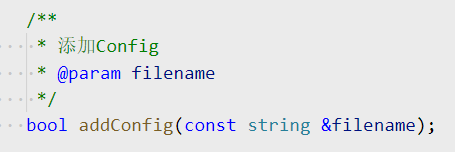
- Add comments in Chinese to functions in .h file (encoding: GB2312)
- Use the predefined function in .cpp file (encoding: utf-8)
- Trigger C++ suggestions
Results
- In .h file, the commnet texts were rendered as expected.
- In .cpp file, the comment texts got bad encoding.

Version
VS Code version: Code 1.41.0 (9579eda04fdb3a9bba2750f15193e5fafe16b959, 2019-12-11T18:37:42.077Z)
OS version: Windows_NT x64 10.0.18362
Remote OS version: Linux x64 3.10.107-1-tlinux2_kvm_guest-0049
System Info
| Item | Value |
|---|---|
| CPUs | Intel(R) Core(TM) i7-6700 CPU @ 3.40GHz (8 x 3408) |
| GPU Status | 2d_canvas: enabled flash_3d: enabled flash_stage3d: enabled flash_stage3d_baseline: enabled gpu_compositing: enabled metal: disabled_off multiple_raster_threads: enabled_on oop_rasterization: disabled_off protected_video_decode: unavailable_off rasterization: enabled skia_renderer: disabled_off surface_control: disabled_off surface_synchronization: enabled_on video_decode: enabled viz_display_compositor: enabled_on viz_hit_test_surface_layer: disabled_off webgl: enabled webgl2: enabled |
| Load (avg) | undefined |
| Memory (System) | 15.89GB (9.43GB free) |
| Process Argv | |
| Screen Reader | no |
| VM | 0% |
| Item | Value |
|---|---|
| Remote | SSH: docker |
| OS | Linux x64 3.10.107-1-tlinux2_kvm_guest-0049 |
| CPUs | Intel(R) Xeon(R) CPU E5-26xx v4 (8 x 3199) |
| Memory (System) | 15.42GB (1.76GB free) |
| VM | 0% |
Activity
sean-mcmanus commentedon Dec 18, 2019
We only support UTF-8 currently. We're tracking adding support for other encodings with #414 .
bobbrow commentedon Jan 9, 2020
Closing duplicate issue.
sean-mcmanus commentedon Sep 2, 2020
BOT Man (@BOT-Man-JL) Should be fixed with https://github.com/microsoft/vscode-cpptools/releases/tag/0.30.0-insiders4 . Let us know if you see any remaining bugs with non-UTF-8 encodings.
BOT-Man-JL commentedon Sep 2, 2020
Sean McManus (@sean-mcmanus) It still has this problem...
Colengms commentedon Sep 2, 2020
Hi BOT Man (@BOT-Man-JL) . It's not mentioned here, but have you set VS Code's
files.encodingsetting toGB2312? The C/C++ Extension does not replicate VS Code'sfiles.autoGuessEncodingbehavior when opening files directly from disk, but should now usefiles.encodingwhen opening files from disk (if the file does not have a BOM, and is not UTF16 LE/BE). If you are settingfiles.encodingand not getting the proper text, that may be a bug in 0.30.0-insiders4. If you are expecting the encoding to be auto-detected without settingfiles.encoding, this issue should be re-opened and de-duped from #414 , as that is not currently supported.BOT-Man-JL commentedon Sep 3, 2020
Hi Colen Garoutte-Carson (@Colengms), my
files.encodingwas not set.In my scenario, I suppose that
files.autoGuessEncodingis necessary because each document is either UTF-8 or GB2312 (not the same encoding), or maybe other encoding.[-]Cannot auto detect text encoding in suggest widget[/-][+]The behavior of the VS Code's "files.autoGuessEncoding" setting is not replicated when opening files directly from disk[/+][-]The behavior of the VS Code's "files.autoGuessEncoding" setting is not replicated when opening files directly from disk[/-][+]The behavior of VS Code's "files.autoGuessEncoding" setting is not replicated when opening files directly from disk[/+]1 remaining item
yume-chan commentedon Dec 2, 2021
Will it help if vscode provides the guessed file encoding to extensions? microsoft/vscode#824
Colengms commentedon Dec 2, 2021
Simon Chan (@yume-chan) The C/C++ extension loads header files directly from disk, that are (probably) not open in the editor. These files are loaded in a secondary (IntelliSense) native processes. Having an API to detect file encoding that we could pass an arbitrary file path to, might be helpful. But it's unlikely that performance would be acceptable when making synchronous round-trips from native code to TypeScript for each header in a TU with many headers. So, no, it likely would not helpful. We would likely need to accurately replicate the behavior of VS Code's
autoGuessEncodingfunctionality in native code.Guojx67 commentedon Oct 17, 2022
Same issue. So is there any solutions for this bug?
sean-mcmanus commentedon Oct 21, 2022
No, it's not fixed yet.
Guojx67 commentedon Jan 10, 2023
I solved my problem in a strange way. Previously, I set vscode file.encoding to gb2312. However, the hovering comments are garbled. But after reading the issue log again, I found that it has been emphasized that "files directly opened from the disk are opened as the file. encoding format". So in principle, there should be no problem. Then I tried to set vscode file.encoding to gbk, and found that the problem was solved.
The strange thing is that when I set vscode file.encoding to gb2312, there is no problem with the encoding format of files directly opened from vscode.
Anyway, my problem has been solved. thanks.
v-frankwang commentedon Jan 26, 2025
VS Code Version:1.96.4
C/C++ Extension Version:1.23.4
We verified this issue on the latest version, when I open the folder from disk and open the .cpp file directly it reproduces the issue, but when I open the .h file once and then open the .cpp file the issue does not occur anymore!
.cpp file
.h file
v-frankwang commentedon Feb 20, 2025
VS Code Version:1.97.2
C/C++ Extension Version:1.24.1(pre-release)
We verified this issue on the latest version, when I open the folder from disk and open the .cpp file directly it reproduces the issue, but when I open the .h file once and then open the .cpp file the issue does not occur anymore!
.cpp file
.h file