Repository navigation
Intellisense broken for functions in tgmath, e.g. sqrt #5337

Description

Type: LanguageService
Describe the bug
- OS and Version: Linux Mint 19.3 Cinnamon
- VS Code Version: 1.43.2
- C/C++ Extension Version: 0.27.0
- Other extensions you installed (and if the issue persists after disabling them): none
- Does this issue involve using SSH remote to run the extension on a remote machine?: no
- A clear and concise description of what the bug is, including information about the workspace (i.e. is the workspace a single project or multiple projects, size of the project, etc).
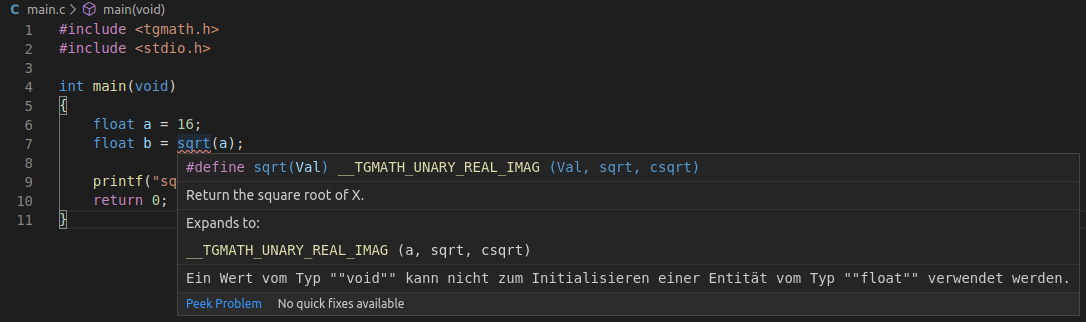
Intellisense seems to be broken for functions included via tgmath as it underlines the functions complaining about the return type being void instead of float (or whatever the type of the variable the result should be assigned to is). I disabled all other extensions and this issue still persists.
Steps to reproduce
- Create a file main.c with the following content
#include <tgmath.h>
#include <stdio.h>

int main(void)
{
    float a = 16;
    float b = sqrt(a);

    printf("sqrt(%f) = %f\n", a, b);
    return 0;
}
- See that
sqrtis underlined red by the Intellisense engine. - Check that you can compile the program just fine using the command
gcc main.c -o main -Wall -std=c99 -lm
Expected behavior
sqrt should not be marked as an error.
Logs
-------- Diagnostics - 21.4.2020, 13:12:12
Version: 0.27.0
Current Configuration:
{
    "name": "Linux",
    "includePath": [
        "${workspaceFolder}/**"
    ],
    "defines": [],
    "compilerPath": "/usr/bin/gcc",
    "cStandard": "c11",
    "cppStandard": "c++17",
    "intelliSenseMode": "clang-x64",
    "compilerArgs": [],
    "browse": {
        "path": [
            "${workspaceFolder}/**"
        ],
        "limitSymbolsToIncludedHeaders": true
    }
}
Translation Unit Mappings:
[ /home/simon/test/main.c ]:
    /home/simon/test/main.c
Translation Unit Configurations:
[ /home/simon/test/main.c ]:
    Process ID: 4786
    Memory Usage: 14 MB
    Compiler Path: /usr/bin/gcc
    Includes:
        /usr/lib/gcc/x86_64-linux-gnu/7/include
        /usr/local/include
        /usr/lib/gcc/x86_64-linux-gnu/7/include-fixed
        /usr/include/x86_64-linux-gnu
        /usr/include
    Standard Version: c11
    IntelliSense Mode: gcc-x64
    Other Flags:
        --gcc
        --gnu_version=70500
Total Memory Usage: 14 MB
Dateiausschluss: **/.git
Dateiausschluss: **/.svn
Dateiausschluss: **/.hg
Dateiausschluss: **/CVS
Dateiausschluss: **/.DS_Store
Dateiausschluss: **/.vscode
Suchausschluss: **/node_modules
Suchausschluss: **/bower_components
Suchausschluss: **/*.code-search
Suchausschluss: **/.vscode
Füllen Sie den Cache für die Includevervollständigung auf.
Dateien werden ermittelt...
  Ordner wird verarbeitet (rekursiv): /usr/lib/gcc/x86_64-linux-gnu/7/include/
  Ordner wird verarbeitet (rekursiv): /usr/local/include/
  Ordner wird verarbeitet (rekursiv): /usr/lib/gcc/x86_64-linux-gnu/7/include-fixed/
  Ordner wird verarbeitet (rekursiv): /usr/include/
  Ordner wird verarbeitet (rekursiv): /home/simon/test/
  Dateiermittlung: 3941 Datei(en) verarbeitet
  0 Datei(en) aus Datenbank entfernt
Die Ermittlung von Dateien ist abgeschlossen.
Verbleibende Dateien werden analysiert...
  Analyse: 0 Datei(en) verarbeitet
Die Analyse verbleibender Dateien ist abgeschlossen.
Screenshots
Additional context
Activity
sean-mcmanus commentedon Apr 21, 2020
I'm not able to repro the bug on Linux with gcc8. Can you provide more repro details, such as the output of running C/C++: Log Diagnostics from the VS Code Command Palette?
lprc commentedon Apr 22, 2020
Sure, here's the output of C/C++: Log Diagnostics (was also already in the issue description):
Anything else I can do?
I tried changing the IntelliSense mode and c-standard but that didn't solve it. I'm running with gcc 7.5.0 if that matters. Seems like gcc 8 isn't listed in apt yet for Linux Mint.
lprc commentedon Apr 22, 2020
I just tried the previous version of the extension (0.26.3) which works just fine. Here's the log output again:
I also checked the issue on another machine (also Linux Mint), still the same error with the current version 0.27.0.
github-actions commentedon Jan 17, 2021
Hey Sean McManus (@sean-mcmanus), this issue might need further attention.
SimonH (@lprc), you can help us out by closing this issue if the problem no longer exists, or adding more information.
github-actions commentedon Mar 19, 2021
This issue has been closed automatically because it needs more information and has not had recent activity.