Skip to content

Will not load projects #982

Closed
Closed

Description

Environment:

  • VS Code Version: 1.66.2 (Universal)
  • Extension Version: v0.22.2022042300 (extension pack version)
  • JDK Type & Version:
    openjdk version "17.0.2" 2022-01-18
    OpenJDK Runtime Environment Temurin-17.0.2+8 (build 17.0.2+8)
    OpenJDK 64-Bit Server VM Temurin-17.0.2+8 (build 17.0.2+8, mixed mode, sharing)
  • OS Type & Version: MacOS 12.3.1

Step to Reproduce:
1: Open VSCode
2: Open Java project
Expected Behavior:
Load Java projects
Actual Behavior:
Showing loading animation. Will not end/load projects

The video below shows this animation. It has been doing this for the past 10 minutes.
https://user-images.githubusercontent.com/77035115/165851846-39ab1bf1-5225-4b4e-8be0-84463e3857ab.mov
Related Issues:
I couldn't find any other issues related to this. If there are any, please link me to them.

Activity

  1. testforstephen commented on Apr 29, 2022

    @testforstephen
    Contributor

    Fastnlight (@fastnlight0) thank you for reaching us. Could you help share the logs at these places?

    • F1 -> Java: Open All Log Files

    • Messages at OUTPUT panel for "Language Support for Java"

      image

  2. fastnlight0 commented on Apr 30, 2022

    @fastnlight0
    Author

    Here are the logs from the F1 menu:

    {
      message: "Use the JDK from '' as the initial default project JDK.",
      level: 'info',
      timestamp: '2022-04-29 20:37:26.017'
    }
    {
      message: 'Starting Java server with: /Users/zanesinno/.vscode/extensions/redhat.java-1.5.0-darwin-x64/jre/17.0.2-macosx-x86_64/bin/java --add-modules=ALL-SYSTEM --add-opens java.base/java.util=ALL-UNNAMED --add-opens java.base/java.lang=ALL-UNNAMED --add-opens java.base/sun.nio.fs=ALL-UNNAMED -Declipse.application=org.eclipse.jdt.ls.core.id1 -Dosgi.bundles.defaultStartLevel=4 -Declipse.product=org.eclipse.jdt.ls.core.product -Djava.import.generatesMetadataFilesAtProjectRoot=false -Dfile.encoding=utf8 -XX:+UseParallelGC -XX:GCTimeRatio=4 -XX:AdaptiveSizePolicyWeight=90 -Dsun.zip.disableMemoryMapping=true -Xmx1G -Xms100m -jar /Users/zanesinno/.vscode/extensions/redhat.java-1.5.0-darwin-x64/server/plugins/org.eclipse.equinox.launcher_1.6.400.v20210924-0641.jar -configuration /Users/zanesinno/Library/Application Support/Code/User/globalStorage/redhat.java/1.5.0/config_ss_mac -data /Users/zanesinno/Library/Application Support/Code/User/workspaceStorage/ee616d6522d5d2db153a470601b55ec1/redhat.java/ss_ws',
      level: 'info',
      timestamp: '2022-04-29 20:37:26.170'
    }
    {
      message: 'Starting Java server with: /Users/zanesinno/.vscode/extensions/redhat.java-1.5.0-darwin-x64/jre/17.0.2-macosx-x86_64/bin/java --add-modules=ALL-SYSTEM --add-opens java.base/java.util=ALL-UNNAMED --add-opens java.base/java.lang=ALL-UNNAMED --add-opens java.base/sun.nio.fs=ALL-UNNAMED -Declipse.application=org.eclipse.jdt.ls.core.id1 -Dosgi.bundles.defaultStartLevel=4 -Declipse.product=org.eclipse.jdt.ls.core.product -Djava.import.generatesMetadataFilesAtProjectRoot=false -Dfile.encoding=utf8 -XX:+UseParallelGC -XX:GCTimeRatio=4 -XX:AdaptiveSizePolicyWeight=90 -Dsun.zip.disableMemoryMapping=true -Xmx1G -Xms100m -XX:+HeapDumpOnOutOfMemoryError -XX:HeapDumpPath=/Users/zanesinno/Library/Application Support/Code/User/workspaceStorage/ee616d6522d5d2db153a470601b55ec1/redhat.java -jar /Users/zanesinno/.vscode/extensions/redhat.java-1.5.0-darwin-x64/server/plugins/org.eclipse.equinox.launcher_1.6.400.v20210924-0641.jar -configuration /Users/zanesinno/Library/Application Support/Code/User/globalStorage/redhat.java/1.5.0/config_mac -data /Users/zanesinno/Library/Application Support/Code/User/workspaceStorage/ee616d6522d5d2db153a470601b55ec1/redhat.java/jdt_ws',
      level: 'info',
      timestamp: '2022-04-29 20:37:26.270'
    }
    {
      message: 'Language Support for Java server encountered error and will shut down: undefined, Error: write EPIPE',
      level: 'error',
      timestamp: '2022-04-29 20:37:29.257'
    }
    {
      message: '[Error - 8:37:29 PM] Connection to server is erroring. Shutting down server.',
      level: 'info',
      timestamp: '2022-04-29 20:37:29.264'
    }
    {
      message: 'Language Support for Java server encountered error: [object Object], Error [ERR_STREAM_DESTROYED]: Cannot call write after a stream was destroyed',
      level: 'error',
      timestamp: '2022-04-29 20:37:29.266'
    }
    {
      message: '[Error - 8:37:29 PM] Connection to server got closed. Server will not be restarted.',
      level: 'info',
      timestamp: '2022-04-29 20:37:29.267'
    }
    

    Output (Language support for Java):

    [Error - 8:37:29 PM] Connection to server is erroring. Shutting down server.
    [Error - 8:37:29 PM] Connection to server got closed. Server will not be restarted.
    

    Here is a .log file that also opened:
    java.log

  3. feitosa-daniel commented on May 2, 2022

    @feitosa-daniel

    I am experiencing the same behavior. My system configuration is very similar.

    • VS Code Version: same
    • Extension Version: same
    • JDK Type & Version: same
    • OS Type & Version: MacOS 12.3

    Copying & Pasting the folder (cp -R) solved for me. VS Code can recognize the project in the new, identical folder. But the old folder still fails. Could it be some cache-related thing?

  4. fastnlight0 commented on May 2, 2022

    @fastnlight0
    Author

    I just cleared my cache and tried the copy/paste method described above, but neither worked.

  5. testforstephen commented on May 5, 2022

    @testforstephen
    Contributor

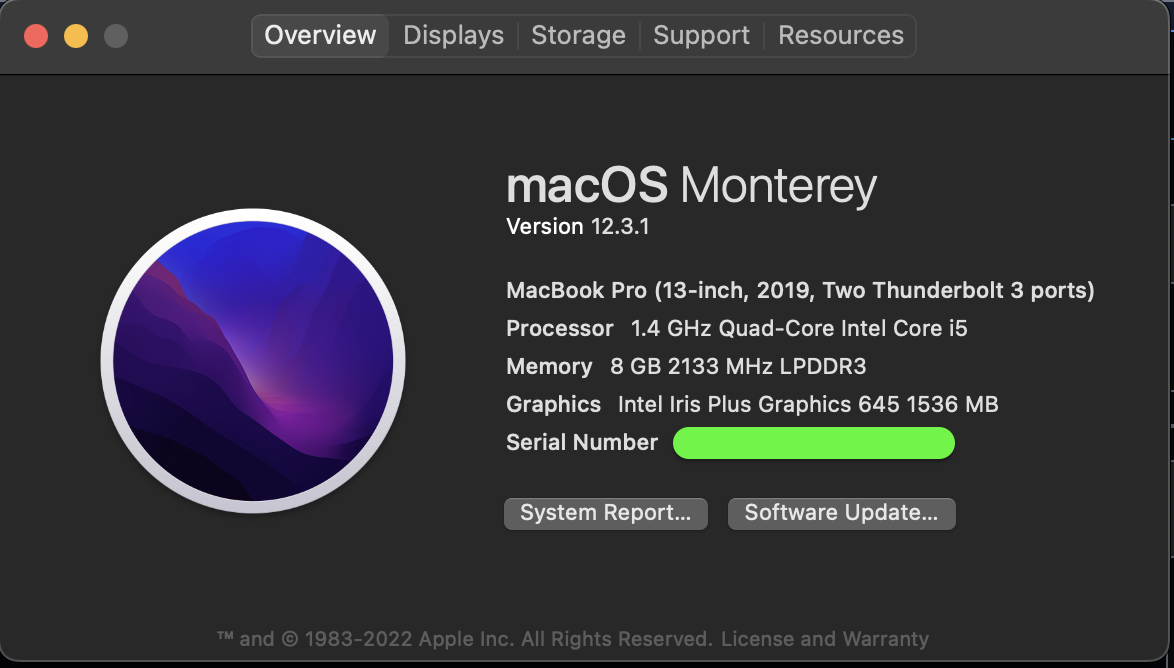
    Fastnlight (@fastnlight0) thank you for sharing the logs. Are you running VS Code on a Mac M1 machine?

  6. fastnlight0 commented on May 5, 2022

    @fastnlight0
    Author

    No. I've attached the info below
    Screen Shot 2022-05-05 at 7 39 00 AM

  7. testforstephen commented on May 6, 2022

    @testforstephen
    Contributor
    Caused by: org.eclipse.core.internal.dtree.ObjectNotFoundException: Tree element '/Sudoku_5939162/_/src/Sudoku.java' not found.
    	at org.eclipse.core.internal.dtree.AbstractDataTree.handleNotFound(AbstractDataTree.java:260)
    	at org.eclipse.core.internal.dtree.DeltaDataTree.getData(DeltaDataTree.java:599)
    	at org.eclipse.core.internal.dtree.DataDeltaNode.asBackwardDelta(DataDeltaNode.java:54)
    	at org.eclipse.core.internal.dtree.NoDataDeltaNode.asBackwardDelta(NoDataDeltaNode.java:63)
    	at org.eclipse.core.internal.dtree.NoDataDeltaNode.asBackwardDelta(NoDataDeltaNode.java:63)
    	at org.eclipse.core.internal.dtree.NoDataDeltaNode.asBackwardDelta(NoDataDeltaNode.java:63)
    	at org.eclipse.core.internal.dtree.DataDeltaNode.asBackwardDelta(DataDeltaNode.java:51)
    	at org.eclipse.core.internal.dtree.DeltaDataTree.asBackwardDelta(DeltaDataTree.java:91)
    	at org.eclipse.core.internal.dtree.DeltaDataTree.reroot(DeltaDataTree.java:835)
    	at org.eclipse.core.internal.dtree.DeltaDataTree.reroot(DeltaDataTree.java:834)
    	at org.eclipse.core.internal.dtree.DeltaDataTree.reroot(DeltaDataTree.java:811)
    	at org.eclipse.core.internal.watson.ElementTree.immutable(ElementTree.java:522)
    	at org.eclipse.core.internal.resources.SaveManager.restore(SaveManager.java:733)
    	at org.eclipse.core.internal.resources.SaveManager.startup(SaveManager.java:1557)
    	at org.eclipse.core.internal.resources.Workspace.startup(Workspace.java:2482)
    	at org.eclipse.core.internal.resources.Workspace.open(Workspace.java:2233)
    	at org.eclipse.core.resources.ResourcesPlugin.start(ResourcesPlugin.java:475)
    	at org.eclipse.osgi.internal.framework.BundleContextImpl$2.run(BundleContextImpl.java:818)
    	at org.eclipse.osgi.internal.framework.BundleContextImpl$2.run(BundleContextImpl.java:1)
    	at java.base/java.security.AccessController.doPrivileged(Unknown Source)
    	at org.eclipse.osgi.internal.framework.BundleContextImpl.startActivator(BundleContextImpl.java:810)
    	... 54 more
    

    Fastnlight (@fastnlight0) I have a look at the logs, looks like the reason is that the workspace state is corrupt, and Java extension fails to restore it.

    Could you try the command "F1 -> Java: Clean Java Language Server Workspace"? That will clean the workspace cache, and reload the workspace again.

  8. fastnlight0 commented on May 6, 2022

    @fastnlight0
    Author

    It worked! Thank you so much!

Sign up for free to join this conversation on GitHub. Already have an account? Sign in to comment

Metadata

Metadata

Labels

No labels
No labels

Type

No type

Projects

No projects

    Milestone

    No milestone

    Relationships

    None yet

    Development

    No branches or pull requests

    Issue actions