Repository navigation
Send code selection to debug console #14494
Description

When using the debugger it would be nice to have a keyboard shortcut that would send the selected line(s) to the debug console and immediately execute them there This would be conceptually similar to how one can select lines and invoke them in the interactive window.
Activity
karthiknadig commentedon Oct 26, 2020
Thank you for the suggestion! We have marked this issue as "needs decision" to make sure we have a conversation about your idea. We plan to leave this feature request open for at least a month to see how many 👍 votes the opening comment gets to help us make our decision.
luabud commentedon Dec 2, 2020
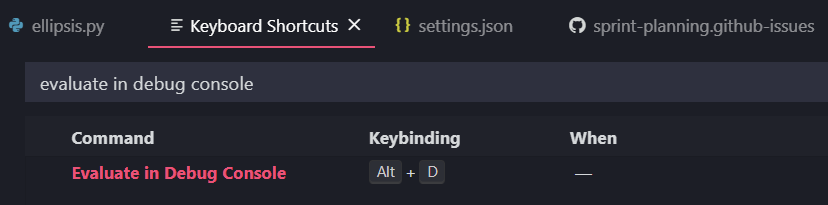
You can actually customize your own shortcut to send selection to the debug console! Open the command palette (View > Command Palette...) and run "Preferences: Open Keyboard Shortcuts". Then look for "Evaluate in Debug Console" and add a short cut for it. For example, I added "Alt + D" for mine:
abielr commentedon Dec 3, 2020
Luciana Abud (@luabud), thank you, I didn't know about that shortcut. It would also be nice if this functionality behaved more like sending a line to the interactive console, for example if you haven't selected anything and you run the shortcut it will anything automatically execute the whole current line. Multi-line evaluation also seems problematic (at least on my Mac), when I try to execute multiple lines it sends them to the console but then doesn't execute them, I still have to click down on the console and hit the Enter key.