You signed in with another tab or window. Reload to refresh your session.You signed out in another tab or window. Reload to refresh your session.You switched accounts on another tab or window. Reload to refresh your session.Dismiss alert
Did some initial investigation and looks like we have to discuss some UX when it comes to getting linters on user machine. Things to discuss:
Currently we provide a command to set linters. Upon selecting a linter we install the said linter into the user's selected python environment. With the new approach we don't have to install linter into user's environment. We have it already installed in the linting extension. We may have to point the user to installed linting extension. The command itself still has purpose in providing more details, like it could show the already installed linting extensions and allow users to choose from that.
Respecting existing settings, we have several settings specific to linters and we need to decide which ones we want to support.
python.linting.enabled: Global switch for linters. Can be used to turn off all linters.
python.linting.<linter>Enabled: Switch to turn on/off individual linters.
python.linting.<linter>Path: Path to specific linting binary. With the new linting extension, this can be a path to binary (in which case we will attempt to find the importable library), path to dir containing the importable binary, or <linter> in which case it will wither use the linter installed in the environment, or use the one shipped with the extension.
python.linting.<linter>Args: Additional arguments to linters.
python.linting.<linter>CategorySeverity: Translation between linter severity and VS Code's severity.
We may need to provide a way for users to control when they get linting, onType, onSave, or manual. We need to decide if this is enough or we need more. For manual we can use the existing Run Linter command to do linting on demand.
Logging for linting via LSP, and linters will have their own Output panel.
just the copy-paste from the flake8 thread, as it was hidden there
Karthik Nadig (@karthiknadig)Brett Cannon (@brettcannon) I see the new extension has exactly the same problem as the current built-in implementation - python.flake8Path doesn't accept the name of the executable to run (FileNotFoundError: [Errno 2] No such file or directory: 'flake8'), so you can't just specify e.g. flake8 - you need to specify the full path instead of just allowing PATH to do the job.
What's the actual use-case? All the tools like black, mypy, tox, pytest, isort, coverage etc. provide support for pyproject.toml-based configuration, as it becomes a standard approach nowadays to maintain only one file. All, but not flake8, as anthony sottile (@asottile) continues his fight against TOML (and yes, I know the thread, but sorry - other maintainers were able to add the support, in a native way or the legacy one like tox, but anthony sottile (@asottile) is the only one who prefers to stay against the community just because of his personal crusade, even when the PR was already done).
It's extremely annoying attitude, but anyway - there's a solution for that: pflake8, so the flake8 wrapper, which adds the support for pyproject.toml. It works pretty well also with VS Code, but because of the above issue - I need to provide the full path like ./.venv/bin/pflake8, which makes the config tied to the very concrete venv, so I can't set it globally as pflake8 to allow finding that on PATH, I also can't keep the workspace-level settings.json in a generic form, shareable with other teammates.
Jakub Lański (@jaklan) We have not manually added any restriction to python.flake8Path. We pass whatever is set in python.flake8Path to subprocess.run. There might be some bug in the prototype where it is not doing the right thing. The point of the prototype was to demo flake8 over LSP and how the integration will look like. That build is not a final product that we will be shipping.
Karthik Nadig (@karthiknadig) the problem is it's not passed to subprocess.run. When you specify the path as flake8 / pflake8 and look at logs, you will see the command doesn't include -p flake8 (p)flake8 but still -m flake8. When we look at the old linter script, we can see invoke = sys.argv[1] line - it should be -p in that case, but it's still -m. It looks like the setting is completely ignored and doesn't reach the linter script.
What determines the value of sys.argv[1]? It has to come from some setting parsing logic on the VSCode side imho.
You can see the entire source code in the extension directory. It should be under ~/.vscode/extensions/python-flake8<version>/bundled/linter/linter_server.py. No there is no VS Code logic that does anything here. When the linter server is launched all the settings are sent, as is, to linter_server.py. There is likely a bug in linter_server.py where it is not constructing the args as needed by subprocess.run.
You are missing the point of this exercise. This issue and the prototype were created to look at how linting over LSP will look like and what we want to do about the ownership of the LSP part and the extension part. Feedback is definitely welcome, but I don't want that to detract from the actual discussion.
We designed this specifically with python community in mind. So, most of the real work in the python code. We don't do anything other than hooking up the LSP in the TS code. You should be able to change anything, detect any additional paths, change environment variables, multiplex multiple linters, or literally anything else from the python code. As long as the messages between VS Code and linter_sertver.py are conforming to LSP it will work. The TS code is tooling agnostic.
Karthik Nadig (@karthiknadig) I understand the goal, but in the flake8 repository you just mentioned this thread as a place to share feedback about the PoC, so I thought it's worth to mention this problem as it's also related to the new extension, but ofc I can create a separate issue for that, whatever you prefer 😉
Yes, I was reading the code of both old and new linter implementation, but I'm just still missing the one thing I mentioned above - sys.argv[1] is either -m or -p, but you don't specify that in the config directly - it's somewhere deducted based on the value of python.flake8Path (or lack of it). So my question is - where does it come from, where's the logic responsible just for selecting this flag?
I am confused, which logs are you talking about? Output > Python logs or output > flake8 logs? I just tested with "python.flake8Path": ["flake8"] and it seems to work well for me:
Python extension (i.e, specifically ms-python.python extension) linter implementation has the logic where it checks flake8 and uses -m. The flake8 LSP prototype does not do that.
Jakub Lański (@jaklan) all of our work will end up being open source, so if you want an extension for pflake8 it should be very straightforward for you to create.
Brett Cannon (@brettcannon) sure, but if it's only a matter of specifying the name of the executable then there's no sense to create an additional extension doing exactly the same.
Karthik Nadig (@karthiknadig) yeah, I was referring to the old extension above, sorry for the confusion. Regarding the new one - I still have some strange issues with python.flake8Path:
I've created a new, clean project
I've created a new Python venv and installed both flake8 and pflake8
but when I try to save & format a sample file, I get:
Traceback (most recent call last):
  File "/Users/lanskij/.vscode/extensions/kanadig.python-flake8-0.0.1/bundled/libs/pygls/protocol.py", line 316, in _handle_notification
    self._execute_notification(handler, params)
  File "/Users/lanskij/.vscode/extensions/kanadig.python-flake8-0.0.1/bundled/libs/pygls/protocol.py", line 223, in _execute_notification
    handler(*params)
  File "/Users/lanskij/.vscode/extensions/kanadig.python-flake8-0.0.1/bundled/linter/linter_server.py", line 214, in did_save
    _lint_and_publish_diagnostics(server, params)
  File "/Users/lanskij/.vscode/extensions/kanadig.python-flake8-0.0.1/bundled/linter/linter_server.py", line 183, in _lint_and_publish_diagnostics
    diagnostics = _get_diagnostics_using_linter_path(text_document)
  File "/Users/lanskij/.vscode/extensions/kanadig.python-flake8-0.0.1/bundled/linter/linter_server.py", line 154, in _get_diagnostics_using_linter_path
    raise ex
  File "/Users/lanskij/.vscode/extensions/kanadig.python-flake8-0.0.1/bundled/linter/linter_server.py", line 148, in _get_diagnostics_using_linter_path
    result = subprocess.run(
  File "/Users/lanskij/.pyenv/versions/3.9.9/lib/python3.9/subprocess.py", line 505, in run
    with Popen(*popenargs, **kwargs) as process:
  File "/Users/lanskij/.pyenv/versions/3.9.9/lib/python3.9/subprocess.py", line 951, in __init__
    self._execute_child(args, executable, preexec_fn, close_fds,
  File "/Users/lanskij/.pyenv/versions/3.9.9/lib/python3.9/subprocess.py", line 1821, in _execute_child
    raise child_exception_type(errno_num, err_msg, err_filename)
FileNotFoundError: [Errno 2] No such file or directory: 'flake8'
I have verified the PATH value with linting_lsp.show_message_log(str(os.environ["PATH"])) and I got:
so it seems the venv is not taken into account (== not added to the PATH), so then being able to specify the executable works only for global packages. Is it a bug or is it expected? Personally I would expect the activated venv to be on the PATH.
Jakub Lański (@jaklan) If you have a python virtual environment with flake8 installed then you should not be using python.flake8path. The linting server will automatically use the flake8 installed in the environment.
With the prototype extension python.flake8path should only be used if you really need do. the prototype extension itself ships with flake8, and it picks up flake8 from selected environments. The path should be used as an exception not the norm. For cases where people have global flake8, will in those cases you have it in global PATH so it should work there as well.
For now, the server is just using exec instead of shell exec (which will allow activated launches). we avoided those to reduce load times. some scenarios the activation time for environments can exceed 30 seconds.
Karthik Nadig (@karthiknadig) okay, so we have a different logic for using module and path, where the first one tries to find the executable in the current venv and falls back to the shipped one if missing, but the latter doesn't deal with the current venv at all. So it seems to be a deadlock for the pflake8 scenario, when you would like to go with the module flow, just with another executable name 😕
Just out of curiosity - if activating the venv would be problematic for the path scenario due to time, how is it different in the module scenario, where we actually take that into consideration?
In the module scenario we are not activating. we are directly launching python executable from the virtual env folder. That python binary often does the work of adding the right site-packages directory to the sys.path. So, we really don't need to activate by running the activate script.
There is another way, launch vscode from an activated terminal. Also, note once we create a repository for the prototype, community can make suggestions. IF the community feels that the LSP should run from an activate environment then we may do that. Again, the point of this whole thing was that it is going to be easier to make contribution because most of the code will sit in python, with TS part just doing the LSP hook up.
Karthik Nadig (@karthiknadig) sure, waiting for the official release then to re-raise the issue, thanks for all the explanations, looking forward to contribute!


Activity
karthiknadig commentedon Sep 24, 2021
Did some initial investigation and looks like we have to discuss some UX when it comes to getting linters on user machine. Things to discuss:
python.linting.enabled: Global switch for linters. Can be used to turn off all linters.python.linting.<linter>Enabled: Switch to turn on/off individual linters.python.linting.<linter>Path: Path to specific linting binary. With the new linting extension, this can be a path to binary (in which case we will attempt to find the importable library), path to dir containing the importable binary, or<linter>in which case it will wither use the linter installed in the environment, or use the one shipped with the extension.python.linting.<linter>Args: Additional arguments to linters.python.linting.<linter>CategorySeverity: Translation between linter severity and VS Code's severity.onType,onSave, ormanual. We need to decide if this is enough or we need more. Formanualwe can use the existingRun Lintercommand to do linting on demand.5 remaining items
jaklan commentedon Feb 18, 2022
Karthik Nadig (@karthiknadig) Brett Cannon (@brettcannon) I see the new extension has exactly the same problem as the current built-in implementation -
python.flake8Pathdoesn't accept the name of the executable to run (FileNotFoundError: [Errno 2] No such file or directory: 'flake8'), so you can't just specify e.g.flake8- you need to specify the full path instead of just allowingPATHto do the job.What's the actual use-case? All the tools like
black,mypy,tox,pytest,isort,coverageetc. provide support forpyproject.toml-based configuration, as it becomes a standard approach nowadays to maintain only one file. All, but notflake8, as anthony sottile (@asottile) continues his fight against TOML (and yes, I know the thread, but sorry - other maintainers were able to add the support, in a native way or the legacy one liketox, but anthony sottile (@asottile) is the only one who prefers to stay against the community just because of his personal crusade, even when the PR was already done).It's extremely annoying attitude, but anyway - there's a solution for that:
pflake8, so the flake8 wrapper, which adds the support forpyproject.toml. It works pretty well also with VS Code, but because of the above issue - I need to provide the full path like./.venv/bin/pflake8, which makes the config tied to the very concrete venv, so I can't set it globally aspflake8to allow finding that onPATH, I also can't keep the workspace-levelsettings.jsonin a generic form, shareable with other teammates.karthiknadig commentedon Feb 18, 2022
Jakub Lański (@jaklan) We have not manually added any restriction to
python.flake8Path. We pass whatever is set inpython.flake8Pathtosubprocess.run. There might be some bug in the prototype where it is not doing the right thing. The point of the prototype was to demo flake8 over LSP and how the integration will look like. That build is not a final product that we will be shipping.jaklan commentedon Feb 18, 2022
Karthik Nadig (@karthiknadig) the problem is it's not passed to
subprocess.run. When you specify the path asflake8/pflake8and look at logs, you will see the command doesn't include-p flake8 (p)flake8but still-m flake8. When we look at the old linter script, we can seeinvoke = sys.argv[1]line - it should be-pin that case, but it's still-m. It looks like the setting is completely ignored and doesn't reach the linter script.What determines the value of
sys.argv[1]? It has to come from some setting parsing logic on the VSCode side imho.karthiknadig commentedon Feb 18, 2022
You can see the entire source code in the extension directory. It should be under
~/.vscode/extensions/python-flake8<version>/bundled/linter/linter_server.py. No there is no VS Code logic that does anything here. When the linter server is launched all the settings are sent, as is, tolinter_server.py. There is likely a bug inlinter_server.pywhere it is not constructing theargsas needed bysubprocess.run.You are missing the point of this exercise. This issue and the prototype were created to look at how linting over LSP will look like and what we want to do about the ownership of the LSP part and the extension part. Feedback is definitely welcome, but I don't want that to detract from the actual discussion.
We designed this specifically with python community in mind. So, most of the real work in the python code. We don't do anything other than hooking up the LSP in the TS code. You should be able to change anything, detect any additional paths, change environment variables, multiplex multiple linters, or literally anything else from the python code. As long as the messages between VS Code and
linter_sertver.pyare conforming to LSP it will work. The TS code is tooling agnostic.jaklan commentedon Feb 18, 2022
Karthik Nadig (@karthiknadig) I understand the goal, but in the flake8 repository you just mentioned this thread as a place to share feedback about the PoC, so I thought it's worth to mention this problem as it's also related to the new extension, but ofc I can create a separate issue for that, whatever you prefer 😉
Yes, I was reading the code of both old and new linter implementation, but I'm just still missing the one thing I mentioned above -
sys.argv[1]is either-mor-p, but you don't specify that in the config directly - it's somewhere deducted based on the value ofpython.flake8Path(or lack of it). So my question is - where does it come from, where's the logic responsible just for selecting this flag?karthiknadig commentedon Feb 18, 2022
I am confused, which logs are you talking about? Output > Python logs or output > flake8 logs? I just tested with
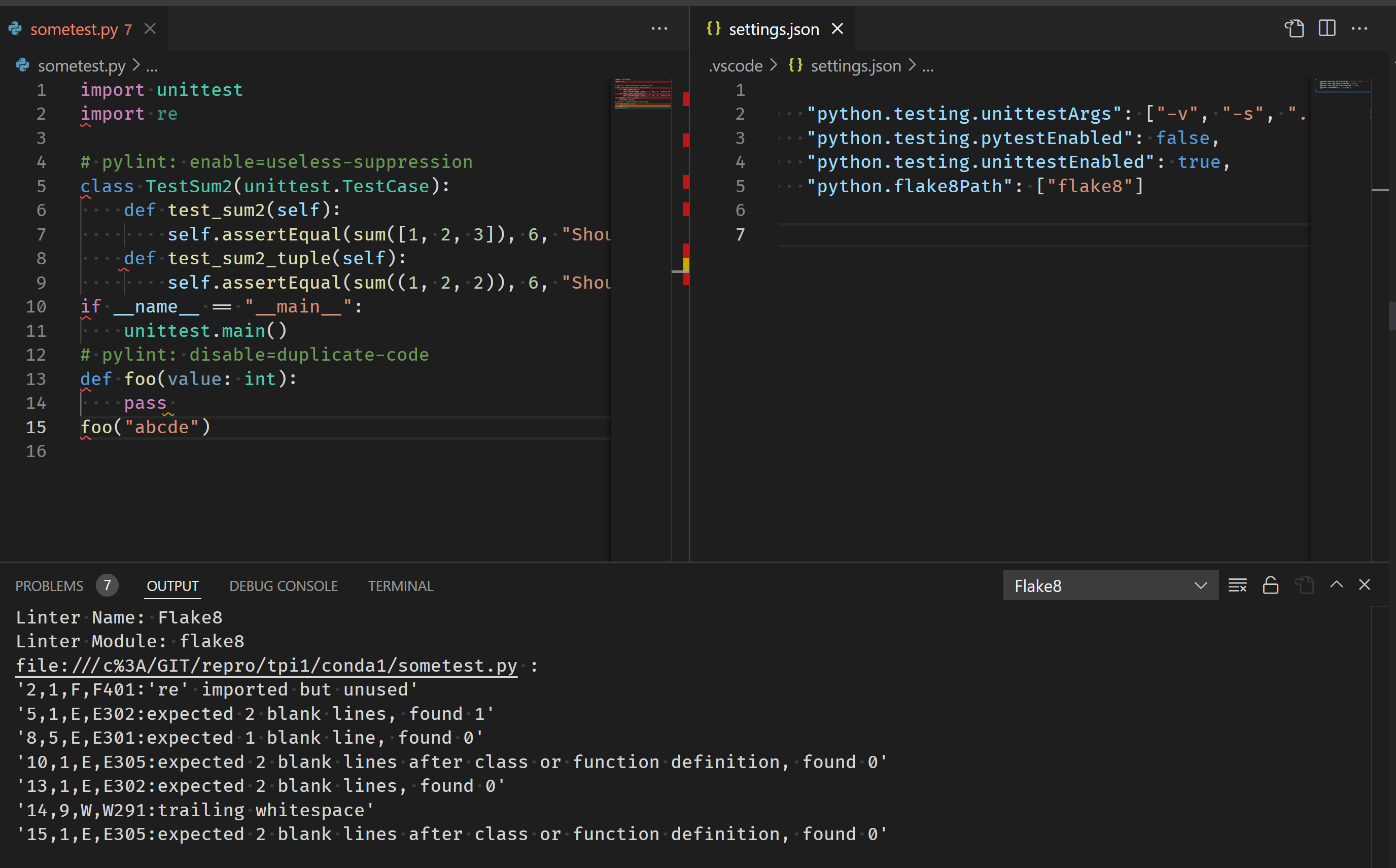
"python.flake8Path": ["flake8"]and it seems to work well for me:Python extension (i.e, specifically ms-python.python extension) linter implementation has the logic where it checks
flake8and uses-m. The flake8 LSP prototype does not do that.brettcannon commentedon Feb 22, 2022
Jakub Lański (@jaklan) all of our work will end up being open source, so if you want an extension for
pflake8it should be very straightforward for you to create.jaklan commentedon Feb 27, 2022
Brett Cannon (@brettcannon) sure, but if it's only a matter of specifying the name of the executable then there's no sense to create an additional extension doing exactly the same.
Karthik Nadig (@karthiknadig) yeah, I was referring to the old extension above, sorry for the confusion. Regarding the new one - I still have some strange issues with
python.flake8Path:flake8andpflake8settings.jsonfile in.vscodewith the following content:{ "python.linting.flake8Enabled": false, "python.flake8Path": [ "flake8" ] }I have verified the
PATHvalue withlinting_lsp.show_message_log(str(os.environ["PATH"]))and I got:so it seems the venv is not taken into account (== not added to the
PATH), so then being able to specify the executable works only for global packages. Is it a bug or is it expected? Personally I would expect the activated venv to be on thePATH.karthiknadig commentedon Feb 28, 2022
Jakub Lański (@jaklan) If you have a python virtual environment with
flake8installed then you should not be usingpython.flake8path. The linting server will automatically use the flake8 installed in the environment.With the prototype extension
python.flake8pathshould only be used if you really need do. the prototype extension itself ships with flake8, and it picks up flake8 from selected environments. The path should be used as an exception not the norm. For cases where people have global flake8, will in those cases you have it in globalPATHso it should work there as well.For now, the server is just using exec instead of shell exec (which will allow activated launches). we avoided those to reduce load times. some scenarios the activation time for environments can exceed 30 seconds.
jaklan commentedon Feb 28, 2022
Karthik Nadig (@karthiknadig) okay, so we have a different logic for using
moduleandpath, where the first one tries to find the executable in the current venv and falls back to the shipped one if missing, but the latter doesn't deal with the current venv at all. So it seems to be a deadlock for thepflake8scenario, when you would like to go with themoduleflow, just with another executable name 😕Just out of curiosity - if activating the venv would be problematic for the
pathscenario due to time, how is it different in themodulescenario, where we actually take that into consideration?karthiknadig commentedon Feb 28, 2022
In the module scenario we are not activating. we are directly launching
pythonexecutable from the virtual env folder. That python binary often does the work of adding the right site-packages directory to thesys.path. So, we really don't need to activate by running the activate script.There is another way, launch vscode from an activated terminal. Also, note once we create a repository for the prototype, community can make suggestions. IF the community feels that the LSP should run from an activate environment then we may do that. Again, the point of this whole thing was that it is going to be easier to make contribution because most of the code will sit in python, with TS part just doing the LSP hook up.
jaklan commentedon Feb 28, 2022
Karthik Nadig (@karthiknadig) sure, waiting for the official release then to re-raise the issue, thanks for all the explanations, looking forward to contribute!