Repository navigation
Terminals opened in Code adopt malformed $PATH (breaks virtualenv) #2333
Description

Environment data
- VS Code version: 1.25.1
- Extension version (available under the Extensions sidebar): 2018.7.1
- OS and version: MacOS 10.13.6
- Python version (& distribution if applicable, e.g. Anaconda): 2.7.15/3.7.0 installed via homebrew
- Type of virtual environment used (N/A | venv | virtualenv | conda | ...): virtualenv/virtualenvwrapper
- Relevant/affected Python packages and their versions: N/A
Actual behavior
Terminals opened with "Pthon: Create Terminal" or "Open New Terminal" command open with a $PATH that has the active virtualenv at the end, rather than the beginning:
/usr/local/bin:/usr/bin:/bin:/usr/sbin:/sbin:/Users/alexw/.virtualenvs/foobarenv3x/bin
Even though the calling terminal has $PATH = /Users/alexw/.virtualenvs/foobarenv3x/bin:/usr/local/bin:/usr/bin:/bin:/usr/sbin:/sbin
Expected behavior
Child terminals should have $PATH=/Users/alexw/.virtualenvs/foobarenv3x/bin:/usr/local/bin:/usr/bin:/bin:/usr/sbin:/sbin, same as the terminal code was launched from.
Steps to reproduce:
-In a terminal, I activate a virtualenv, my_env (workon my_env)
At this point:
$ echo $PATH
/Users/alexw/.virtualenvs/my_env/bin:....
-Launch code into this environment (my_env) $ code .
-open example.py in that directory.
At this point:
my python interpreter according to the bottom left corner of the debug view is the python 3.x installed into my_env, so that's correct.
If I open developer tools and check "process.env" at console, $PATH is prepended as above - which is what I'd expect.
-open a terminal with "Python: create terminal" or "open a new terminal"
At this point:
$ echo $PATH
/usr/local/bin:/usr/bin:/bin:/usr/sbin:/sbin:/Users/alexw/.virtualenvs/foobarenv3x/bin
Notably, my virtualenv is in the path, but APPENDED rather than PREPENDED, as it is in both "process.env" and the $PATH of the original calling terminal window.
This leads to all sorts of downstream problems, like auto-opened terminals installing linters and such in the system environment rather than the virtualenv, etc.
Logs
Output for Python in the Output panel (View→Output, change the drop-down the upper-right of the Output panel to Python)
"Cannot edit in read-only editor" (I'm not really sure what I'm supposed to do here)
Output from Console under the Developer Tools panel (toggle Developer Tools on under Help)
INFO no standard startup: panel is active
/Applications/Visual Studio Code.app/Contents/Resources/app/out/vs/workbench/workbench.main.js:270 [Extension Host] Python Extension: Linter 'pylint' is not installed. Please install it or select another linter". Error: Module 'pylint' not installed.
	at PythonExecutionService.<anonymous> (/Users/alexw/.vscode/extensions/ms-python.python-2018.7.1/out/client/common/process/pythonProcess.js:96:27)
	at Generator.next (<anonymous>)
	at fulfilled (/Users/alexw/.vscode/extensions/ms-python.python-2018.7.1/out/client/common/process/pythonProcess.js:12:58)
	at <anonymous>
t.log @ /Applications/Visual Studio Code.app/Contents/Resources/app/out/vs/workbench/workbench.main.js:270
/Applications/Visual Studio Code.app/Contents/Resources/app/out/vs/workbench/workbench.main.js:2364 Linter pylint is not installed.
e.onDidNotificationChange @ /Applications/Visual Studio Code.app/Contents/Resources/app/out/vs/workbench/workbench.main.js:2364
Activity
alexwhittemore commentedon Aug 4, 2018
Further info - debugging seems broken, due to this. When one clicks "run", I guess the file in question is run in a new terminal that gets created with the malformed path.
d3r3kk commentedon Aug 4, 2018
Thanks for supplying the extra information. We are planning on going over our conda environment logic this release (and you've already been part of that conversation so thanks x2!).
I've reproduced this information locally on Ubuntu 18.04 using a conda 4.4.0/python 3.6.1 version installed via pyenv. I've activated a conda environment in my terminal (called issue2333) and invoked
code .from within that environment.Here's the terminal's environment:
...and here's the environment reported within Code's interactive terminal:
The path does seem to come from elsewhere (I am confident this is a known issue), and is not aware of the current active conda environment yet.
If I look at the status bar in VSCode, I see this too:
...and if I hover:
...which tells me we actually do have the right information
handy. But if I run the
Python: Create Terminalcommand I get this:When I click on the status bar interpreter, I see the command bar open up with this information:
and as expected, you can see that the current interpreter is just set to
python(the system one, presumably, based on my current PYENV shims in the PATH).If I select the actual environment I want though (issue2333) and then attempt to open a terminal, everything works as expected.
d3r3kk commentedon Aug 4, 2018
Something to consider as we investigate opportunities for improvement #2288, Eric Snow (@ericsnowcurrently).
alexwhittemore commentedon Aug 4, 2018
Oh interesting- you’re saying, if I go to the effort of actually selecting the interpreter that’s already reflected, terminals start working properly with the environment directory out in the front of the PATH? I’ll have to check that tomorrow.
Oh, I didn’t mention - for the sake of clarity, this actually works exactly as expected under Windows, using virtualenv-powershell (and, obviously, powershell)
EDIT: Yes ok, that makes sense - everything gets set up almost-correctly, and if I "Python: Select Interpreter" then terminals get created with the right PATH (or at least, my virtualenv directory prepended AND appended, which seems wrong, but works).
Interesting aside: I'm using a goofy hack for MacOS to fix framework-build-of-python vs the not-framework-build that virtualenv always uses no matter what. This enables matplotlib and other GUI libraries without doing any library-specific workaround. It's the virtualenv-pythonw-osx bit from the middle of pypa/virtualenv#54 (comment)
When employing this hack, I actually show two Pythons in my virtualenv directory:

If I select the Python.app version, the GUI libs work, and if I select the .../bin/python3 version, they don't since it's the not-framework-build. But anyway, with the hack in place, the app version is the one default on my PATH, and code picks that up without intervention as I'd hope (except, still, the terminals don't, per this report)
brettcannon commentedon Aug 8, 2018
Alex Whittemore (@alexwhittemore) yes, if you have to explicitly select the interpreter you want to work, else
Python: Create Terminaldoesn't know what environment to activate (we have nothing to do withOpen New Terminal). Does this mean your issue has been taken care of?brettcannon commentedon Aug 8, 2018
Alex Whittemore (@alexwhittemore) Also remember that we don't support active virtual environments from the terminal as you have previously expected.
alexwhittemore commentedon Aug 8, 2018
Actually, this is super odd - now that I revisit this, my entire previous post seems no longer to be true.
No virtualenv:
(The default-selected python, per hovering over the python item in the bottom left, is highlighted)

That is, in the default case, the default-selected interpreter isn't the correct path. But I think that's probably a trick of symlinks, since the python shell that comes up ultimately is correct.
In a virtualenv:
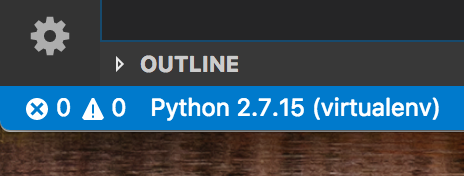
(when I hover, the python path is just "python")
Notice here that python is detected as the wrong version:
all references to `python` in this virtualenv are, in fact, python 3.x If I select that python anyway, the $PATH of newly opened terminals doesn't get corrected (or rather, prepended) like in my previous post. And at this point, when I hover over the "Python" item bottom left, it shows the correct path (the Python.app version from the select interpreters screenshot), but it still says Python 2.7.15. Like it's showing the path from the settings item, but the `process.env.path` isn't correct, and it's pulling the python version info from a naive execution of `python --version`So at this point, that previous workaround is totally nonfunctional and I can't get code to use the correct python interpreter no matter what I set or try.
brettcannon commentedon Aug 8, 2018
Alex Whittemore (@alexwhittemore) this whole issue has gotten rather wordy and hard to follow. 😉 Are you launching VS Code from a terminal with an activated virtual environment and expecting it to work? How are you creating the environment? What is your
settings.jsonsaying your Python settings are?alexwhittemore commentedon Aug 8, 2018
Honestly, I'm not even sure what the long and short of it is, at this point.
Recall that
That's to make a magic framework build wrapper around the python that gets put in the virtualenv.
It seems if I leave that incantation active in postactivate, vscode totally breaks - I can't select the interpreter - it sees the right path but with the wrong python version reflected, and when I select it, newly created child terminals fail to launch with the right $PATH still.
If I remove that from postactivate and just do it myself, manually, once, code seems to work, provided I manually select the interpreter such that
One thing that's still odd: with that settings.json entry, if I launch code, the terminal that's automatically open at launch doesn't have the right path, even though the interpreter is set correctly per hovering over the "Python" item in the bottom left.


If I then create a new one with Shift-Cmd-P Python: Create Terminal, I see:
It looks like code sees that my selected interpreter is in a virtualenv, and actually calls the activate script when launching a terminal? Maybe that's why my postactivate modification is fouling things up?
alexwhittemore commentedon Aug 8, 2018
Also, not strictly related, but in response to your earlier post (Sorry, looks like we happened to post coincidently!):
What I don't get is, even if this is the case, how is it possible that the $PATH 1:2:3:4:5 becomes 2:3:4:5:1 when VSCode is launched from the terminal? I don't even know how that's possible without deliberate modification, and it seems to me like everything would "just work" the way I intuitively expect it to if that path simply didn't get mangled.
brettcannon commentedon Aug 8, 2018
Alex Whittemore (@alexwhittemore) yeah, it sounds like your shell setup is a bit too magical for us. 😉 If that
fix-osx-virtualenvis screwing with yourPATHthen it will definitely not do what you want as we won't be followingPATHin the extension itself from the terminal you ran that command in post-launch.And the terminals are working as expected. I think what you want is #1387 which will activate automatically for any normal terminal versus having to use
Python: Create Terminalto get automatic environment activation.brettcannon commentedon Aug 8, 2018
I'm going to close this as I think the issue is a misunderstanding about what we can and cannot handle. If you think that's wrong, Alex Whittemore (@alexwhittemore) , then just let us know.
alexwhittemore commentedon Aug 9, 2018
(First, thanks for putting up with my walls-of-text, I wish I knew how to make them more concise than they are without leaving out critical info)
I'm actually not so sure about that, and what you mention with issue 1387 actually makes me think there's even MORE going on here out of the ordinary than what we've talked about.
Let me start by clearing up some of the water I muddied in my last couple posts, as I've just done some exhaustive differential diagnosis in a clean macOS virtual machine where there's no way there are any confounding variables.
There are four variables at play here - python 2 vs 3, virtualenvwrapper and thus virtualenv, this fix-osx-virtualenv wrapper, and vscode itself.
Starting with fix-osx-virtualenv: I've verified that it doesn't interfere at all in any of my test cases EXCEPT with a python3 virtualenv, and for a reason that's easily worked-around. It doesn't change the PATH at all - I think it compiles to a Python.app that contains the binary you started with, which is all macOS needs to make all of its GUI APIs work correctly.
What was getting in the way there: you need to call fix-osx-virtualenv to set up the magic Python.app in your virtualenv. The more-robust way to do that is in $WORKON_HOME/postactivate, which gets called every time you activate a virtualenv. Therefore, the check for the magic .app happens EVERY time the environment is activated, in case somehow it hadn't yet. But whatever that command does, it's like 5% broken in python 3.x, and it completes successfully, but it messes up vscode somehow in the case of vscode launched from an activated python3 virtualenv.
The solution to that is to put the magic check in $WORKON_HOME/postmkvirtualenv - only check for the magic Python.app when you make the virtualenv, and that code never runs after that. This doesn't piss off VSCode, since it happens 100% outside of the scope of VSCode.
With that out of the way:
So the proper workflow here to get a working vscode that executes your python in the virtual environment context is this:
In my case, specifically, with the fix-osx-virtualenv shim in there, there will be two detected interpreter paths under the virtualenv directory, and the proper one to select is the Python.app one. Namely, my working settings.json:
Even though at the terminal,
That part I totally don't understand, but I've established that it's immaterial - pick the Python.app path and all works perfectly.
Okay, so why do I think there is still some actual bug here?
Fundamentally, VSCode mangles $PATH, and I don't know of any good reason for it, which I think is fundamentally wrong whether it's supposed to support "activate virtualenv at temrinal; code .; everything works" functionality or not.
As a test, I did the following at a clean system terminal:
Then, in the integrated terminal:
So without doing ANYTHING else, Code upends my PATH. And I'm convinced, pending evidence, that this mangling is the root cause for why I can't simply
workon my_env; code .and carry on with my day, as I can under Windows.BUT I've got a test of that theory, and simultaneously a workaround!
Here's my whole ~/.bash_profile, annotated for clarity. The relevant part is the last block
Basically, I noticed that all the vscode contexts that I think SHOULD still have the virtualenv environment, and which have a mangled PATH, still have VIRTUAL_ENV set from the parent shell. So I figured, any time I open a shell, if that's set but the PATH is wrong, I should make sure the virtualenv in question is re-activated. This could break things in esoteric edge cases where I explicitly want something higher on my PATH than the venv, but otherwise, it achieves my exact desired result.
To test, I create a new project dir (with no .vscode/, no settings.json, no launch.json).
I then add a launch config (python: current file). my_env is already activated on all embedded terminals in Code, and when I click run, everything works as expected, launching the virtualenv python in the virtualenv context. In other words, this little bit of hackery achieves exactly the behavior I see under Windows by simply un-mangling the PATH.
Ok ok ok, so what about the "even more going on"? I'll hop on over to 1387 to chime in, might as well keep things in straight lines!
EDIT: OH, Derek Keeler (@d3r3kk) - I think I actually take exception to your LAST line! At that point in your workflow, I bet the "run" command works great and launches with the correct python, BUT your TERMINAL is actually still out of whack. Namely, if you were to try to "pip install" something, it wouldn't install into the SELECTED environment, but rather, into the system environment. Even though other child processes (run, linting, etc) seem to behave correctly after you select the proper interpreter.
brettcannon commentedon Aug 9, 2018
So we don't touch your
PATH, which is how I know this isn't our doing. 😉 The closest we come to touching yourPATHis when we activate an environment on your behalf.As for why
which pythonis something you're not expecting from yourPython.app, I would do anls -land see if yourPython.appisn't just a symlink.alexwhittemore commentedon Aug 10, 2018
Maybe YOU don't, but SOMEONE sure is, and I'd love to know who.
I just spun up a totally new, fresh, virgin, not-even-updated High Sierra virtual machine. Haven't installed homebrew, aftermarket Python, nothing.
I downloaded and installed code, opened it once to run the "install code command" command, installed the Python extension, then closed it.
In a terminal window,
In fact, this environment is SO virgin the guest additions aren't installed yet and copy/paste doesn't work, so pardon any possible typos.
Back over in Code: Python: Create Terminal
That is, on an utterly virgin system, vscode is somehow taking the PATH and doing bad things to it.
Of course, maybe by "we" you mean "the vscode-python team." But it's certainly vscode, and not something external to it, unless its some kind of OS-interaction-level bug.
EDIT: for completeness, I uninstalled the Python extension and checked the integrated terminal - PATH is still getting mangled. So it seems like a Code or perhaps electron bug, but anyway, seems like kind of a problematic one?
brettcannon commentedon Aug 10, 2018
Alex Whittemore (@alexwhittemore) yes, when I use the royal "we" I mean this repo and not VS Code. So the weird
PATHmanipulation seems to be a VS Code thing (make sure you have absolutely no extensions installed to verify), so I would report the issue to them.alexwhittemore commentedon Aug 10, 2018
Did just that - reproduced with a completely clean installation. Bug report here: microsoft/vscode#56125
Thanks!