- VSCode Version: Unknown (recent)
- OS Version: Windows 10
Steps to Reproduce:
- Begin installing an update to VS Code.
- Click "cancel" during the update and confirm.
Does this issue occur when all extensions are disabled?: Yes
Today I confirmed installing an update to VS Code, then upon suddenly remembering that I did not want to update, because recent versions have broken the functionality of the Arduino plugin, I clicked the available "cancel" button. The button asked me to confirm, and then stated it was rolling back changes.
After this completed, VSCode was rendered inoperable. Launching with or without extensions from the command line results in the error:
internal/modules/cjs/loader.js:767
    throw err;
    ^

Error: Cannot find module 'C:\Users\allen\AppData\Local\Programs\Microsoft VS Code\resources\app\out\cli.js'
    at Function.Module._resolveFilename (internal/modules/cjs/loader.js:764:15)
    at Module._load (internal/modules/cjs/loader.js:669:27)
    at Module._load (electron/js2c/asar.js:717:26)
    at Function.Module._load (electron/js2c/asar.js:717:26)
    at Function.Module.runMain (internal/modules/cjs/loader.js:991:10)
    at internal/main/run_main_module.js:17:11 {
  code: 'MODULE_NOT_FOUND',
  requireStack: []
}
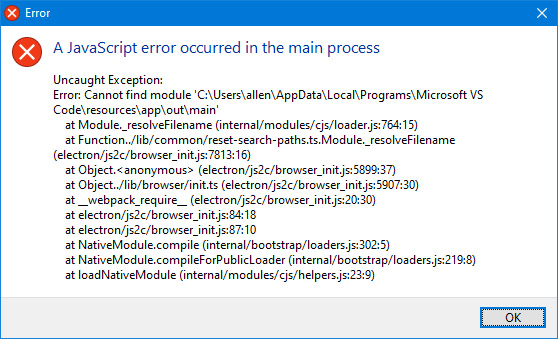
While launching from the GUI shortcut results in the error in the attached image.
It appears there is no way forward but to reinstall VS Code.

Steps to Reproduce:
Does this issue occur when all extensions are disabled?: Yes
Today I confirmed installing an update to VS Code, then upon suddenly remembering that I did not want to update, because recent versions have broken the functionality of the Arduino plugin, I clicked the available "cancel" button. The button asked me to confirm, and then stated it was rolling back changes.
After this completed, VSCode was rendered inoperable. Launching with or without extensions from the command line results in the error:
While launching from the GUI shortcut results in the error in the attached image.

It appears there is no way forward but to reinstall VS Code.