Repository navigation
TS Intellisense hints for parameter defaults? #28925

Description

- VSCode Version: Code 1.13.0 (376c52b, 2017-06-08T16:41:25.571Z)
- OS Version: Linux x64 4.10.8-100.fc24.x86_64
- Extensions:
| Extension | Author | Version |
|---|---|---|
| EditorConfig | EditorConfig | 0.9.3 |
| sort-lines | Tyriar | 1.3.0 |
| npm-intellisense | christian-kohler | 1.3.0 |
| vscode-eslint | dbaeumer | 1.2.11 |
| python | donjayamanne | 0.6.5 |
| pgsql | doublefint | 0.0.8 |
| vscode-npm-script | eg2 | 0.2.0 |
| vue | jcbuisson | 0.1.5 |
| VBScript | luggage66 | 0.0.1 |
| csharp | ms-vscode | 1.10.0 |
| debugger-for-chrome | msjsdiag | 3.1.4 |
| addDocComments | stevencl | 0.0.8 |
| better-align | wwm | 1.1.5 |
Expected:
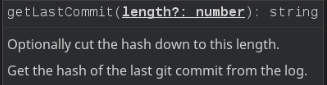
VS Code shows default values in parameter hints.
Actual:
VS Code shows this instead:
Steps to Reproduce
- Paste example code into TS file.
    /**
     * Get the hash of the last git commit from the log.
     *
     * @param {number} [length=7] Optionally cut the hash down to this length.
     */
    static getLastCommit(length : number = 7) : string {
        length = Math.min(32, Math.max(7, length));

        return execSync('git log -n 1 --pretty=format:"%H"', {
            cwd: Path.resolve(__dirname, '..'),
            encoding: 'utf8'
        }).substr(0, length);
    }
Activity
[-]TS Hints for parameter defaults.[/-][+]TS Intellisense hints for parameter defaults?[/+]mjbvz commentedon Jun 21, 2017
Thanks. We would need TypeScript to add support for this. Opened microsoft/TypeScript#16665 to track this upstream