Repository navigation
Command-C & Command-V does not duplicate the whole line #83003

Description

Issue Type: Bug
Previously, Command+C would copy the entire line behind the caret to the clipboard (including the newline). Pasting that line with Command+V would insert the line on the next line.
Today, when I tried to perform the same action, it seems to copy the entire line and then paste it on the same line.
VS Code version: Code 1.39.2 (6ab5985, 2019-10-15T15:33:00.827Z)
OS version: Darwin x64 18.5.0
Extensions (18)
| Extension | Author (truncated) | Version |
|---|---|---|
| unique-lines | bib | 1.0.0 |
| vscode-markdownlint | Dav | 0.31.1 |
| rainbow-csv | mec | 1.3.1 |
| prettify-json | moh | 0.0.3 |
| vscode-docker | ms- | 0.8.1 |
| vscode-kubernetes-tools | ms- | 1.0.5 |
| python | ms- | 2019.10.41019 |
| Go | ms- | 0.11.7 |
| java | red | 0.51.0 |
| vscode-yaml | red | 0.5.3 |
| vscode-open-in-github | sys | 1.13.0 |
| vscodeintellicode | Vis | 1.2.0 |
| vscode-java-debug | vsc | 0.22.0 |
| vscode-java-dependency | vsc | 0.6.0 |
| vscode-java-pack | vsc | 0.8.0 |
| vscode-java-test | vsc | 0.20.0 |
| vscode-maven | vsc | 0.19.1 |
| vscode-proto3 | zxh | 0.3.0 |
Activity
iandees commentedon Oct 21, 2019
Here I am cycling through three different cases:
shelbykauth commentedon Oct 21, 2019
Same.
Tested after "Developer: Reload With Extensions Disabled" as well, behaves the same.
Copied "About Visual Studio Code" info
Version: 1.39.2
Commit: 6ab5985
Date: 2019-10-15T15:33:00.827Z
Electron: 4.2.10
Chrome: 69.0.3497.128
Node.js: 10.11.0
V8: 6.9.427.31-electron.0
OS: Darwin x64 17.7.0
Definitions:
The first copy&paste after a reload is Good, IF you don't click anywhere in the editor.
Reload -> Paste -> Bad
Reload -> Copy -> Paste -> Good
Reload -> Copy -> Move -> Paste -> Good -> Move again -> Paste -> Bad.
False positives for Good if your cursor happens to be at the beginning of the line. Therefore I cannot test...
Reload -> Copy -> Paste -> Good -> Copy -> Paste -> ???
DwaynesWorld commentedon Oct 21, 2019
I am seeing this issue as well as an issue with pasting after using Add Next Occurrence (Command+D, then Command+V). Do you want me to open a new issue, it seems highly related.
However this issue does not occur when I disable all extensions.
Reproduction Steps:
failtext. Command+C.testtext.test. Command+D multiple times.failtext from clipboard.Expected Result:
Actual Result:
Only the first selection is getting overwritten when pasting.
shelbykauth commentedon Oct 21, 2019
It does seem highly related.
Testing with reloading window.
Good: Replaces all occurrences / Pastes at all cursors
Bad: Replaces just one occurrence / Pastes at one cursor.
Note: This is in more rapid succession because it doesn't involve moving the cursor. Follow DwaynesWorld's Process. (Select one word to copy, paste over one word, or paste in one cursor position. Either way is the same)
Cmd+D multiple times -> Reload (cursor stays in multiple places) -> Paste -> Good -> Paste -> Good -> Paste -> Good -> Undo, Undo, Undo -> Paste -> Good -> Wait -> Paste -> Bad -> Paste -> Bad -> Paste -> Bad
-> Reload -> Paste -> Good
-> Reload -> Wait a long time (5 seconds?) ->Paste -> Bad
shelbykauth commentedon Oct 21, 2019
So it seems to be tied into something loading.
DwaynesWorld commentedon Oct 21, 2019
Since I have disabled and re-enabled the extensions, I have not been able to reproduce either issue.
shelbykauth commentedon Oct 21, 2019
Hm... I was able to reproduce both issues with extensions disabled the first time. But now they won't
workfail while extensions are disabled.Reloading normally will bring the issue back after a few seconds. I'll grab the list of extensions.
Extensions
asvetliakov.vscode-run-workspace-tasks
dbaeumer.vscode-eslint
donjayamanne.githistory
eriklynd.json-tools
fabiospampinato.vscode-browser-refresh
felixfbecker.php-intellisense
GrapeCity.gc-excelviewer
joelday.docthis
LaurentTreguier.vscode-simple-icons
lonefy.vscode-JS-CSS-HTML-formatter
mohsen1.prettify-json
ms-mssql.mssql
neilbrayfield.php-docblocker
pthorsson.vscode-jsp
redhat.java
sashaweiss.bracket-jumper
VisualStudioExptTeam.vscodeintellicode
vscjava.vscode-java-debug
vscjava.vscode-java-dependency
vscjava.vscode-java-pack
vscjava.vscode-java-test
vscjava.vscode-maven
vscode-icons-team.vscode-icons
For the record, I have not added any extensions since before this error cropped up.
shelbykauth commentedon Oct 21, 2019
I believe the bug can be described something akin to vsCode's smart pasting not working, and vsCode's pasting behaving like a more standard text editor (NP++ or Window's Notepad, for instance)
tbriggs707 commentedon Oct 21, 2019
I have been seeing similar issues. Here, all I am doing is
Ctrl+CandCtrl+Vto copy/paste the entire line.Expected:
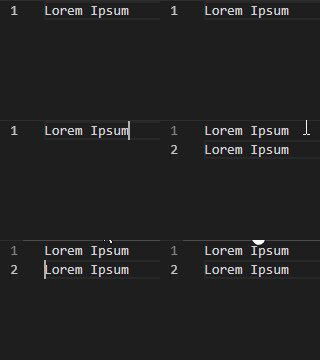
Actual:
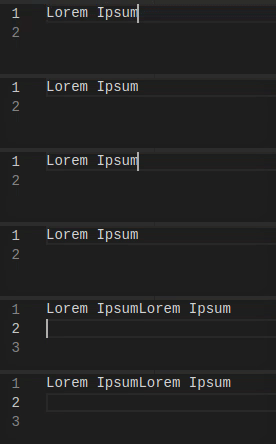
peterneely commentedon Oct 22, 2019
I had this problem too. The "language support for java" extension was causing it. When I disabled it, no more drunken copy/paste. https://marketplace.visualstudio.com/items?itemName=redhat.java
alexdima commentedon Oct 22, 2019
This seems to be caused by the
redhat.javaextension which overrides the paste implementation here. I have opened an issue directly against the extension.Possible workarounds: configure
"java.actionsOnPaste.organizeImports": falseor disable/uninstall theredhat.javaextension.eliyo commentedon Nov 4, 2019
Not sure if this is the same issue, but when writing Python code on VS 1.39.2 an copying/pasting a set of multiple lines, the end-of-line does not get pasted so we have manually go back to the beginning of each line to copy another block.
shelbykauth commentedon Nov 10, 2019
eliyo I don't think that's the same issue, but it's hard to tell from the description. A set of multiple lines does not do the same smart-paste thing, because multiple lines together has to be highlighted, typically. And I'm not sure what you mean about manually going to the beginning of each line to copy another block. Do you mean "copy one line, paste it where it should go, copy the next line, paste it just below the previous paste, copy the next line, paste it just below the previous paste", etc? If so, that's confusing that you must do that even with normal text editors.
If you're referring to multiple separated lines (multiple cursors, one on each line), then yeah, the line end doesn't work normally. Try this. After you have a multi-cursor on each line, hit
Home, then hitShift+Down. Then make sure you either have a cursor on the exact same number of lines or are pasting into one place. And again hitHomebefore pasting.