Repository navigation
how much time do you cost to build nodejs? #3015
Description

- Node.js Version: 14.13.1
- OS: Windows WSL ubuntu
- Scope (install, code, runtime, meta, other?): all
- Module (and version) (if relevant): all
- gcc/g++ version: 9.3.0
- python: 3.8.5
- make: 4.2.1
i have tried to build nodejs for 13 times, and every time, it cost me about 1 hours and 13 minutes. oh my god. please help me. teachers!
Activity
[-]how much time do you take to build nodejs?[/-][+]how much time do you cost to build nodejs?[/+]PoojaDurgad commentedon Oct 14, 2020
@anlexN - I have also tried to build nodejs on ubuntu platform. It cost more than an hour as building takes more time because it requires a lot of work that is lot of cpu time.
anlexN commentedon Oct 15, 2020
oh my god. so what system do you recommand to build nodejs?
gireeshpunathil commentedon Oct 15, 2020
My observation is ~20 minutes of work - in a single CPU system
-j2, makes it ~10 mins-j41to make it ~5 minsanlexN commentedon Oct 16, 2020
why need
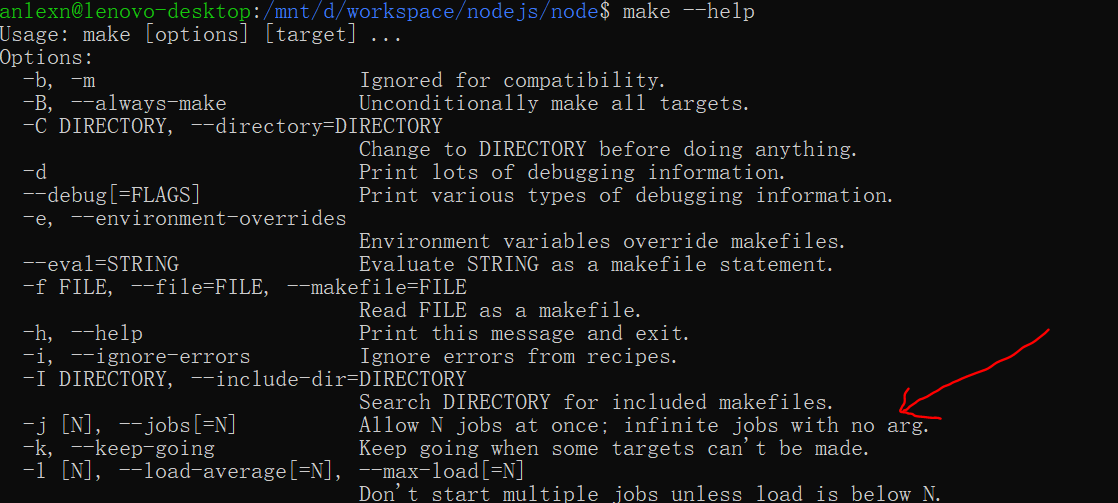
-jarg? i justmake, in theory, make should use infinite jobs.gireeshpunathil commentedon Oct 16, 2020
infinite jobs with no arg.is meant for-jflag. That is:-j100 means 100 jobs at once
-j means infinite jobs at once // this can be tricky, based on your CPU availability though. (I never tried this)
anlexN commentedon Oct 16, 2020
@gireeshpunathil
but i
make -j4, it still costs me more than 1 hour, and you can see my cpu temperature is almost 100C. oh my god! what happened?gireeshpunathil commentedon Oct 16, 2020
@anlexN - sorry, most of the letters in the screen is not readable for me (I guess it is Chinese?). Do you have a mechanism to figure out how many CPUs are there in your system? If not, can you get the output of
systeminfoin the command line ? that will tell us.If there is only one CPU, then adding
-jflag is of no use. Only if there are multiple CPUs, the work can be parallelized and thereby time saved.with respect to CPU temperature - I guess most of the work involved in building node from source is compilation, which is heavily CPU bound, the momentary spike in heat level is justified.
anlexN commentedon Oct 17, 2020
this is my
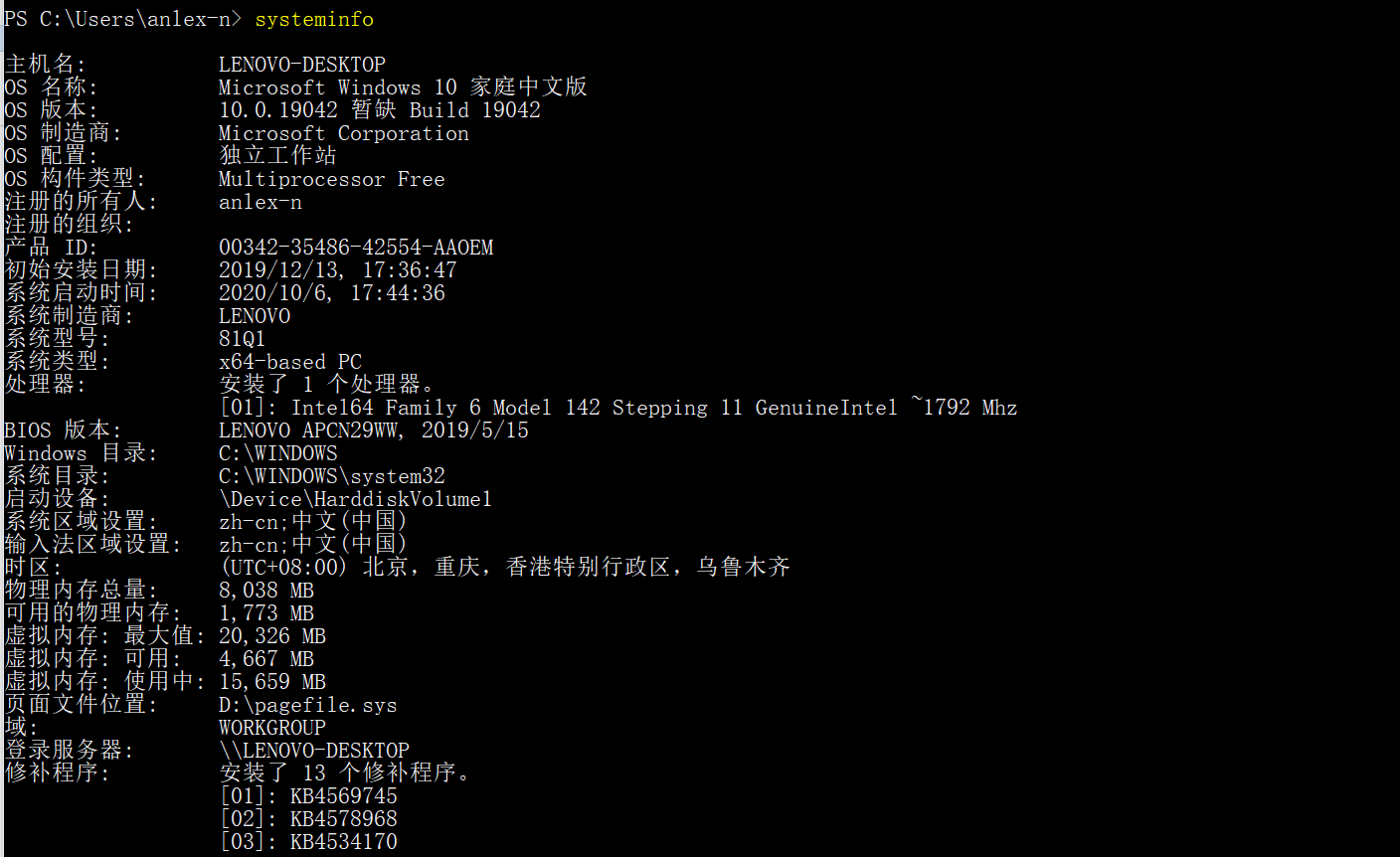
systeminfo:my computer customer service tell me all lenovo computer have only one CPU, include me. so i can not
make -j, so nodejs need us have a very high hardware requirement? @gireeshpunathil , can you give me yoursysteminfo?gireeshpunathil commentedon Oct 17, 2020
I have many systems that I work on.
Mainly, a linux box with 120 CPUs and 1 TB memory - this takes only
aminute to build node.My laptop is an apple macbook with:
as I told, this takes ~20 minutes with
-j4.This this because when there are 2 cores, it is as good as having 2 CPUs from the program's perspective.
Again, with 2 cores and hyperthreading, each core can execute roughly 2 jobs in parallel.
So consider this as having ~4 CPUs. So I usually give
-j4. It still heats up the CPU a little, but as I know it is a computation intensive operation and is bound to limited time, I will wait.anlexN commentedon Oct 17, 2020
@gireeshpunathil can you try to build in windows wsl ubuntu 20.04? please.
gireeshpunathil commentedon Oct 17, 2020
@anlexN - sorry, I don't have such a system. But let me see, if one of my colleague can try this. Will get back in couple of days.
anlexN commentedon Oct 17, 2020
i am waiting for you, teacher.
sxa commentedon Oct 19, 2020
I would say that an hour or so for building Node.js was reasonable for such a configuration. There is a lot of code in Node.js including athe V8 runtime. If you're going to be building it multiple times I'd recommend using ccache which will make subsequent runs significantly faster.
anlexN commentedon Oct 20, 2020
changing nodejs build system is so necessary!
3 remaining items
anlexN commentedon Oct 21, 2020
i hope to decrease build time, i think you can try another build system: GN or Ninja or Bazel.
anlexN commentedon Nov 16, 2020
nodejs source code have perl file, oh my god! now at total, there are 7 languages: c, c++, python, javascript, torque, shell, perl. oh my god. can we give up perl language?
sxa commentedon Nov 16, 2020
The Node.js codebase includes versions of third party components which are built and statically linked in during the build process. The perl code is mostly from the openssl and ICU componenets (plus the one from the CURL project for SSL CA certs) and it would not be appropriate to diverge from what those dependent projects use.
anlexN commentedon Nov 16, 2020
it costs me so long time to understand node source code, oh my god.
PoojaDurgad commentedon May 31, 2021
looks like it can be closed now . pls let me know if that is not the case
J-Cake commentedon Jun 13, 2022
@gireeshpunathil Good sir, where does one buy such a machine ? I want one :P
F3n67u commentedon Jun 13, 2022
I am also very curious how you can buy such a monster computer?
leizongmin commentedon Jun 13, 2022
It took 7 minutes to compile on my machine (32 cores 64G memory, GCC 8.3.0).
J-Cake commentedon Jun 13, 2022
~ 11 mins. and two failed attempts on my end. not too bad
gireeshpunathil commentedon Jun 13, 2022
honestly, I don't know. I use machines from my company, that are purchased and installed by h/w folks. :P
J-Cake commentedon Jun 13, 2022
Wow that's quite the equipment they've got there. Mind me asking what the company is?
gireeshpunathil commentedon Jun 13, 2022
sorry, but I think it is off-topic as it does not directly contribute to the resolution of the issue. (my GitHub profile contains my details)
anlexN commentedon Jun 15, 2022
it's nodejs build system problem by itself, not a money problem, not a computer problem.
ytxmobile98 commentedon Nov 30, 2022
Tried using a DELL Inspiron 14 Plus laptop and a DELL Optiplex 7090 desktop.
Build commands: