Skip to content

Polyfit performance on large datasets - Suboptimal dask task graph #5629

Closed

Description

@jbusecke

What happened:

I am trying to calculate a linear trend over a large climate model simulation. I use rechunker to chunk the data along the horizontal dimensions and make sure that the time dimension (along which I want to calculate the fit) is not chunked.
In my realistic example, this blows up the memory of my workers.

What you expected to happen:
I expected this to work very smoothly because it should be embarassingly parallel (no information of sourrounding chunks is needed and the time dimension is complete in each chunk).

Minimal Complete Verifiable Example:
I think this minimal example shows that the task graph created is not ideal

import xarray as xr
import dask.array as dsa
da = xr.DataArray(dsa.random.random((4,6, 100), chunks=(1,2,100)), dims=['x','y', 'time'])
da

image

Note that the original data array has 12 chunks

When I apply polyfit I get this

poly = da.polyfit('time', 1)
poly

image

Now the number of chunks has decreased to 4? I am not sure why, but this indicates to me that my problem might be related to #4554.

When I look at the task graph it seems that this explains why for very large dataset the computation blows up:
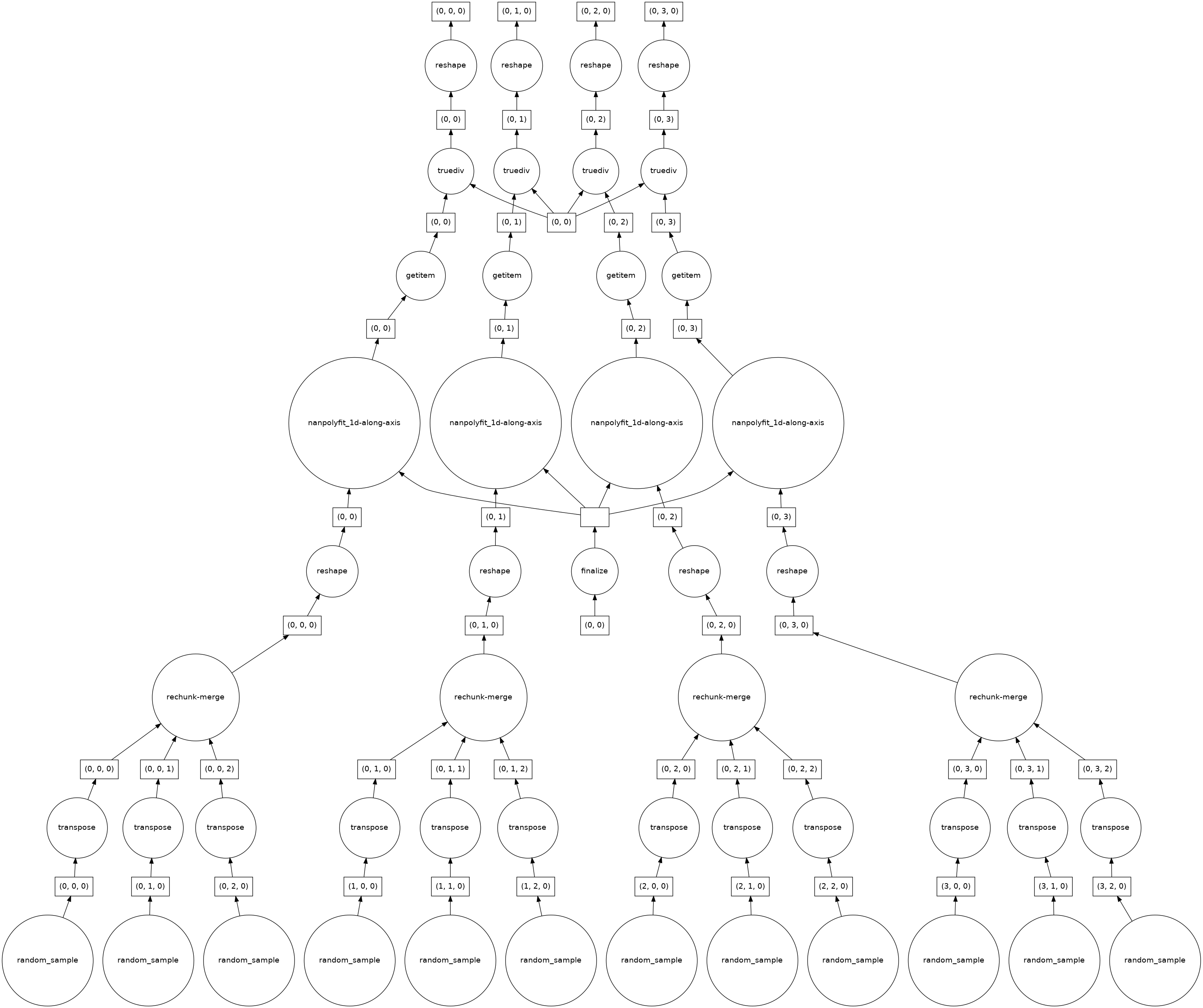
image

As I said before I would expect this calculation to be fully parallelizable, but there seems to be some aggregation/rechunking steps in the bottom layer. How 'bad' these get (e.g. how many input chunks get lumped together in the rechunk/merge step, depends on the chunking structure of the horizontal axes.

cc @TomNicholas

Anything else we need to know?:

Environment:

Output of xr.show_versions()

INSTALLED VERSIONS

commit: None
python: 3.8.8 | packaged by conda-forge | (default, Feb 20 2021, 16:22:27)
[GCC 9.3.0]
python-bits: 64
OS: Linux
OS-release: 5.4.89+
machine: x86_64
processor: x86_64
byteorder: little
LC_ALL: C.UTF-8
LANG: C.UTF-8
LOCALE: en_US.UTF-8
libhdf5: 1.10.6
libnetcdf: 4.7.4

xarray: 0.17.0
pandas: 1.2.4
numpy: 1.20.2
scipy: 1.6.2
netCDF4: 1.5.6
pydap: installed
h5netcdf: 0.11.0
h5py: 3.2.1
Nio: None
zarr: 2.7.1
cftime: 1.4.1
nc_time_axis: 1.2.0
PseudoNetCDF: None
rasterio: 1.2.2
cfgrib: 0.9.9.0
iris: None
bottleneck: 1.3.2
dask: 2021.04.1
distributed: 2021.04.1
matplotlib: 3.4.1
cartopy: 0.19.0
seaborn: None
numbagg: None
pint: 0.17
setuptools: 49.6.0.post20210108
pip: 20.3.4
conda: None
pytest: None
IPython: 7.22.0
sphinx: None

Activity

  1. dcherian commented on Jul 22, 2021

    @dcherian
    Contributor

    It's the same thing: stack is a reshape which can be very inefficient with dask. I think we want to replace the stack+apply_along_axis approach with xr.apply_ufunc(np.polyfit, ..., vectorize=True).

  2. jbusecke commented on Jul 22, 2021

    @jbusecke
    Author

    Should I close this one then?

  3. TomNicholas commented on Jul 22, 2021

    @TomNicholas
    Member

    Thanks for the clear example @jbusecke . I think your example is helpful enough that we should keep this open (even if the same PR will hopefully close both this and #4554)

    Was about to say the same @dcherian! @aulemahal what do you think about how easy it might be to change polyfit to use apply_ufunc?

  4. slevang commented on Jul 22, 2021

    @slevang
    Contributor

    Potentially a useful comparison: here is the task graph for the same problem posed to da.curvefit, which uses xr.apply_ufunc(scipy.optimize.curvefit, ..., vectorize=True). Looks a lot cleaner, and I think xr.polyfit could be re-implemented this way without much trouble.

    import xarray as xr
    import dask.array as dsa
    
    def linear(x, m, b):
        return m * x + b
    
    da = xr.DataArray(dsa.random.random((4,6, 100), chunks=(1,2,100)), dims=['x','y', 'time'])
    fit = da.curvefit('time', linear).curvefit_coefficients

    image

  5. aulemahal commented on Jul 26, 2021

    @aulemahal
    Contributor

    @aulemahal what do you think about how easy it might be to change polyfit to use apply_ufunc?

    Should be easy! The code was written without apply_ufunc for a few reasons, one being that using apply_ufunc+vectorize was slower than the apply_along_axis trick it currently uses. But, with the issue raised here, that might not be true...

  6. dcherian commented on Jul 26, 2021

    @dcherian
    Contributor

    You could write a wrapper that does reshape + apply_along_axis and call that wrapper in apply_ufunc without vectorize

  7. kmuehlbauer commented on Jul 27, 2021

    @kmuehlbauer
    Contributor

    apply_ufunc was refactored to use dask.array.apply_gufunc (which moves the vectorization to dask) after implementation of polyfit.
    So those concerns about slowness of apply_ufunc + vectorization where based on the formerly used _apply_blockwise approach and might not be an issue any more with the current implementation of apply_ufunc .

  8. dcherian commented on Nov 3, 2021

    @dcherian
    Contributor

    In reading through #5933, I realized there's an alternate solution that preserves the desirable feature of fitting along chunked dimensions (at least for skipna=False)

    Since we are only ever fitting along one dimension, we can apply the reshape-other-dimensions operation blockwise. As long as we reshape back in a consistent manner (again blockwise) this is identical to our current stacking approach, but substantially more efficient. In particular, it avoids merging chunks.

    def reshape_block(arr, output_chunks):
        """
        Blockwise reshape array to match output_chunks
    
        This method applies a reshape operation blockwise, so it only makes sense if
        you do not care about the order of elements (along reshaped axes) after reshaping.
        The order of elements will depend on the chunking of ``arr``.
        It is substantially more efficient than a usual reshape, which makes sure array elements
        appear in a numpy-like order regardless of chunking.
    
        Based on https://github.com/dask/dask/issues/4855#issuecomment-497062002
        """
    
        from itertools import product
    
        import numpy as np
        from dask.array import Array
        from dask.base import tokenize
        from dask.highlevelgraph import HighLevelGraph
    
        name = "reshape-block-" + tokenize(arr)
        ichunks = tuple(range(len(chunks_v)) for chunks_v in arr.chunks)
        ochunks = tuple(range(len(chunks_v)) for chunks_v in output_chunks)
    
        dsk = {
            (name, *ochunk): (np.reshape, (arr.name, *ichunk), oshape)
            for ichunk, ochunk, oshape in zip(
                product(*ichunks), product(*ochunks), product(*output_chunks)
            )
        }
    
        graph = HighLevelGraph.from_collections(name, dsk, dependencies=[arr])
        res = Array(graph, name, output_chunks, arr.dtype, meta=arr._meta)
    
        return res
             
            
    def polyfit(da, dim, skipna=False):
        import itertools
    
        import numpy as np
    
        da = da.transpose(..., dim)
        arr = da.data
    
        do_blockwise_reshape = arr.ndim > 1 and any(
            len(chunks) > 1 for chunks in arr.chunks
        )
        if do_blockwise_reshape:
            output_chunks = (tuple(map(np.product, product(*arr.chunks[:-1]))),) + (
                arr.chunks[-1],
            )
            other_dims = tuple(dim_ for dim_ in da.dims if dim_ != dim)
            reshaped = xr.DataArray(
                reshape_block(arr, output_chunks), dims=("__reshaped__", dim)
            )
        else:
            reshaped = da
    
        fit = reshaped.polyfit(dim, 1, skipna=skipna)
    
        if do_blockwise_reshape:
            result = xr.Dataset()
            for var in fit:
                result[var] = (
                    ("degree",) + other_dims,
                    reshape_block(fit[var].data, ((2,),) + arr.chunks[:-1]),
                )
    
            for dim_ in other_dims:
                result[dim_] = da[dim_]
            result["degree"] = fit["degree"]
            return result
        else:
            return fit

    Here's the graph 1 chunk along time (like @jbusecke's example, and skipna=True)
    image

    And when the time dimension is chunked (and skipna=False)

    image

    older version

    Details
    from itertools import product
    
    import numpy as np
    from dask.array import Array
    from dask.array.utils import assert_eq
    from dask.base import tokenize
    from dask.highlevelgraph import HighLevelGraph
    
    
    def reshape_block(arr, output_chunks):
        """
        Blockwise reshape array to match output_chunks
    
        This method applies a reshape operation blockwise, so it only makes sense if
        you do not care about the order of elements (along reshaped axes) after reshaping.
        The order of elements will depend on the chunking of ``arr``.
        It is substantially more efficient than a usual reshape, which makes sure array elements
        appear in a numpy-like order regardless of chunking.
        
        Based on https://github.com/dask/dask/issues/4855#issuecomment-497062002
        """
    
        name = "reshape-block-" + tokenize(arr)
        ichunks = tuple(range(len(chunks_v)) for chunks_v in arr.chunks)
        ochunks = tuple(range(len(chunks_v)) for chunks_v in output_chunks)
    
        dsk = {
            (name, *ochunk): (np.reshape, (arr.name, *ichunk), oshape)
            for ichunk, ochunk, oshape in zip(
                product(*ichunks), product(*ochunks), product(*output_chunks)
            )
        }
    
        graph = HighLevelGraph.from_collections(name, dsk, dependencies=[arr])
        res = Array(graph, name, output_chunks, arr.dtype, meta=arr._meta)
    
        return res
    
    # assumes we're collapsing axes (0,1) and preserving axis 2
    output_chunks = (tuple(map(np.product, product(*arr.chunks[:2]))),) + (arr.chunks[-1],)
    reshaped = reshape_block(arr, output_chunks)
    
    # make sure that we roundtrip
    actual = reshape_block(reshaped, arr.chunks)
    assert_eq(actual, arr) # True
    def new_polyfit(da):
        arr = da.data
        output_chunks = (tuple(map(np.product, product(*arr.chunks[:2]))),) + (
            arr.chunks[-1],
        )
        reshaped = xr.DataArray(reshape_block(arr, output_chunks), dims=("xy", "time"))
        fit = reshaped.polyfit("time", 1, skipna=True)
        result = xr.Dataset()
        for var in fit:
            result[var] = (
                ("degree", "x", "y"),
                reshape_block(fit[var].data, ((2,),) + arr.chunks[:-1]),
            )
    
        result["x"] = da["x"]
        result["y"] = da["y"]
        result["degree"] = fit["degree"]
        return result
    
    
    poly = da.polyfit("time", 1, skipna=False)
    
    xr.testing.assert_allclose(poly, new_polyfit(da))  # True!
  9. Illviljan commented on Nov 4, 2021

    @Illviljan
    Contributor

    @dcherian Is that something that could be implemented in apply_ufunc? Not being able to apply along a chunked dim I think happens quite often, right?

  10. dcherian commented on Nov 4, 2021

    @dcherian
    Contributor

    The problem is that there is no general solution here. You have to write a chunk-aware function and then use apply_ufunc(..., dask="allowed"). This suggestion only works because dask's lstsq can work with chunked dimensions.

  11. TomNicholas commented on Nov 4, 2021

    @TomNicholas
    Member

    The problem is that there is no general solution here. You have to write a chunk-aware function and then use apply_ufunc(..., dask="allowed"). This suggestion only works because dask's lstsq can work with chunked dimensions.

    Sorry, what case does your suggestion not handle? It would be really nice to support chunked core dims if we are going to the effort of rewriting polyfit.

  12. dcherian commented on Nov 4, 2021

    @dcherian
    Contributor

    Is that something that could be implemented in apply_ufunc?

    I interpreted this as asking whether this general idea could be implemented in apply-ufunc, to which the answer is "no" (I think) because it's pretty specific. At best we put this logic in a wrapper function and call that with apply_ufunc(..., dask="allowed").

    This should handle all current use-cases of polyfit, we just change the call to stack.

  13. Illviljan commented on Nov 4, 2021

    @Illviljan
    Contributor

    I was thinking the general idea of reshape_block seems like a clever trick to get around the apply_ufunc constraints and could be used for some other functions as well. But maybe there aren't that many functions that could make use of it.

  14. TomNicholas commented on Nov 4, 2021

    @TomNicholas
    Member

    I was thinking the general idea of reshape_block seems like a clever trick to get around the apply_ufunc constraints and could be used for some other functions as well. But maybe there aren't that many functions that could make use of it.

    The idea seems similar to what we used in xhistogram, which uses blockwise to apply a function that reshapes the data in that block to be 1D.

    EDIT: But in that case our algorithm was one that could be applied blockwise, apply_ufunc was not used.

  15. dcherian commented on Nov 4, 2021

    @dcherian
    Contributor

    a clever trick to get around the apply_ufunc constraints

    To clarify, the constraint here is that lstsq expects 2D arrays, that's why the reshaping was needed in the first place.

    apply_ufunc(..., dask="parallelized") automatically applies your dask-unaware function blockwise which only makes sense if there is a single chunk along the core dimension, hence that constraint.

    apply_ufunc(..., dask="allowed") has no constraints, your function has to know how to deal with chunked data though.

    uses blockwise to apply a function that reshapes the data in that block to be 1D.

    Yes, same idea. Though when you do it that way, you have to implement the function you're applying (that xhistogram PR reimplements dask.array.bincount). Reimplementing lstsq is a lot more complicated, hence this approach.

  16. phofl commented on Aug 14, 2024

    @phofl
    Contributor

    The explosion in chunk sizes will be fixed in the next dask release, task graph is still relatively complex though

  17. phofl commented on Aug 19, 2024

    @phofl
    Contributor

    Looking at this again, I was incorrect. Here is the graph of the current implementation:

    polyfit

    This is basically embarrassingly parallel, so I think we can close this one?

  18. dcherian commented on Aug 19, 2024

    @dcherian
    Contributor

    Very nice! yeah I think @jbusecke's example is the case where the "blockwise reshaping" isn't really needed because the outer most axis has chunk size 1.

    let's leave it open for the more general solution.

  19. added 3 commits that reference this issue on Nov 11, 2024
    39582db
    2bfd6af
    ee7b6d3
  20. added a commit that references this issue on Nov 13, 2024
    5a9ff0b
Sign up for free to join this conversation on GitHub. Already have an account? Sign in to comment

Metadata

Metadata

Assignees

No one assigned

    Type

    No type

    Projects

    No projects

      Milestone

      No milestone

      Relationships

      None yet

      Development

      No branches or pull requests

      Issue actions