Repository navigation
Issue with JDK version changed #1003
Description

I have installed JDK 12 before and the code can run well, but I need JDK 11 for some reason so I uninstall JDK12 and install JDK11. (and I have already changed the environment variable, JAVA_HOME to \jdk-11.0.4)
Then, my VScode can't run it...( I have tried to delete and create a new java file and run )
But it still works on cmd and Powershell with the right version of JDK.
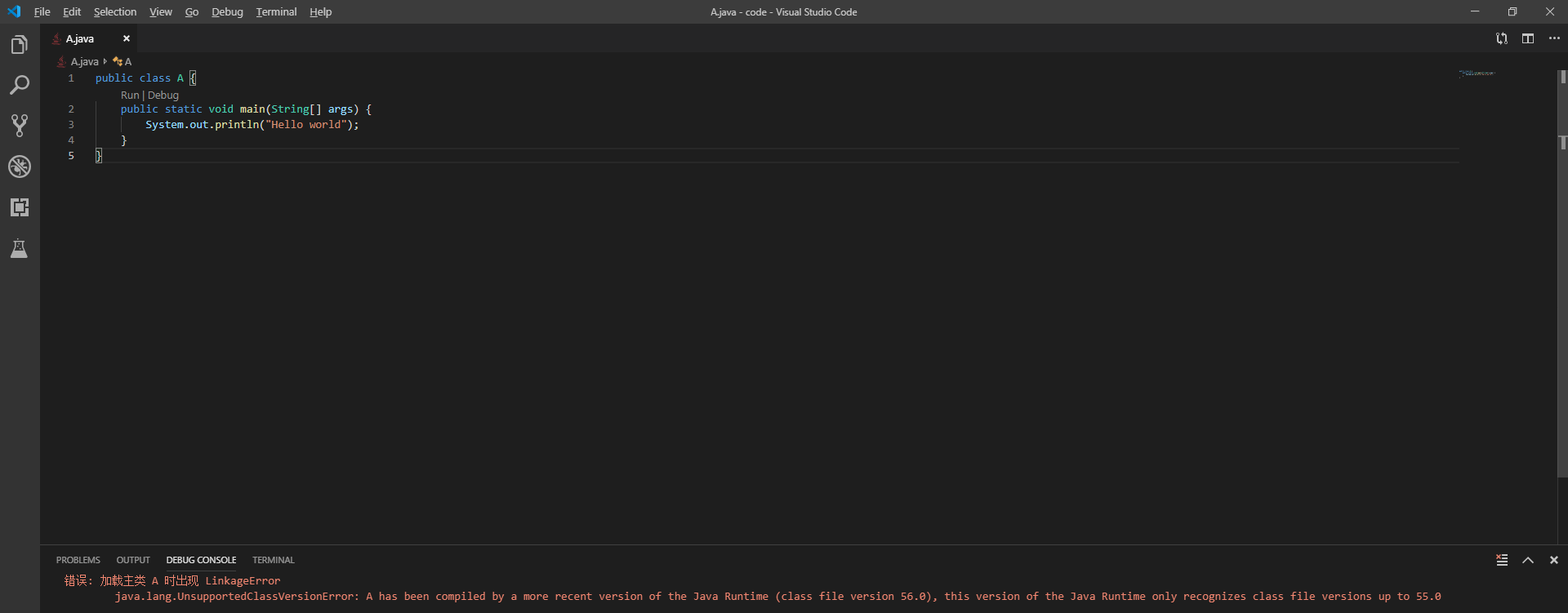
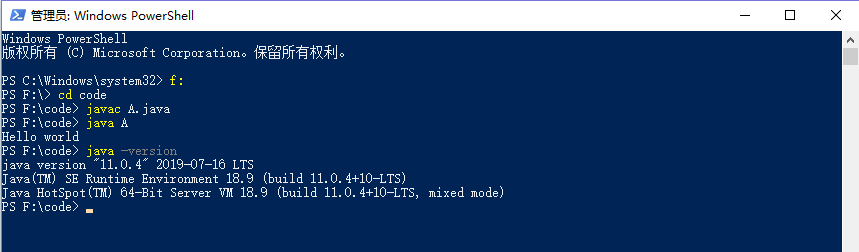
Environment
- Operating System: Windows 10
- JDK version: 11.0.4
- Visual Studio Code version: 1.36.1
- Java extension version: 0.7.1
Steps To Reproduce
- [step 1] install JDK 12 and VScode and Java Extention (then everything works well)
- [step 2] uninstall JDK 12 and install JDK 11
- [step 3] change the environment variable
- [step 4] code can't run on VScode but can run on cmd
Activity
testforstephen commentedon Jul 25, 2019
Could you try VS Code command
Java: Clean the Java language server workspace?B1ex1ayU commentedon Jul 25, 2019
it works! thanks!! @testforstephen