Repository navigation
Gradle using Java 8 - Any gradle build script error returns as a StreamCorruptedException with no useful content instead of the actual gradle exception #1594

Description

When using Gradle with java.configuration.runtimes set to a JavaSE-1.8 JVM, any problems in a build.gradle script will come up with a java.io.StreamCorruptedException instead of the actual exception.
This can be very painful to debug, because it might happen that when executing gradle manually via command line, you might find that the build itself will go through with one of the default targets, but if one of the sub projects is executed it will throw an error.
Environment
- Operating System: Centos 7
- JDK version: 1.8.0b252
- Visual Studio Code version: 1.48.1
- Java extension version: 0.65.0
Steps To Reproduce
- Write a gradle script with any sort of gradle parsing error
- See problems menu that only describes the error as
java.io.StreamCorruptedException: invalid type code: 00
invalid type code: 00
Example script:
this is just random text in a build.gradleCurrent Result
Returns blank exception
Expected Result
- What went wrong:
Could not compile build file 'build.gradle'.
startup failed:
build file 'build.gradle': 1: unexpected token: in @ line 1, column 26.
this is just random text in a build.gradle
Activity
fbricon commentedon Aug 26, 2020
which version of gradle are you using? can you attach a sample project?
snjeza commentedon Aug 26, 2020
@jakegt1 See #1543 (comment)
fbricon commentedon Aug 26, 2020
See https://github.com/redhat-developer/vscode-java/wiki/JDK-Requirements#my-gradle-version-does-not-support-java-11
fbricon commentedon Aug 26, 2020
The JavaSE-8 runtime is used for compiling your Java code, but, by default the Gradle Daemon uses the jdt.ls JVM to run (so 11+).
java.import.gradle.java.homeallows you to run the daemon with a different JVM, but it requires Gradle 4.7 minimum.jakegt1 commentedon Aug 27, 2020
I am using Gradle 5.1.
There is no need for a sample project, it reproduces with a build.gradle with any syntax error.
My settings:
To note, if there is no syntax error things work as expected - i can debug, i get import suggestions etc. It's just that if i do have a syntax error,
My
java.homeproperty is JDK 11, whereas the JDK chosen injava.configuration.runtimesis JDK 8 by default.fbricon commentedon Aug 27, 2020
Ok I see now. Invalid build.gradle errors don't bubble up as diagnostics. Buildship reports it properly, so we must be something wrong:
snjeza commentedon Oct 12, 2020
I can't reproduce the issue.
@fbricon @jakegt1 Could you attach a project example?
jakegt1 commentedon Nov 17, 2020
@fbricon
There was an example build.gradle, just simply have a build.gradle with random content.
but i'm a bit confused? Your picture there seems like you have reproduced it. That is the bug.
jakegt1 commentedon Jan 22, 2021
@snjeza Still having this issue. I am still very confused by you saying that you couldn't reproduce the issue despite your screenshot being an exact reproduction of the issue?
Just really frustrating as i have no idea what the actual error is, so i cannot fix it.
snjeza commentedon Jan 22, 2021
@jakegt1
I can't reproduce this issue:
Java LS reports the gradle errors properly.
What you expect?
jakegt1 commentedon Feb 1, 2021
Your screenshot reproduces the error i was talking about.
Java.io.StreamCorruptedException: invalid type code 00is not a gradle error.This is the error in Java 11:

In comparison to Java 8:
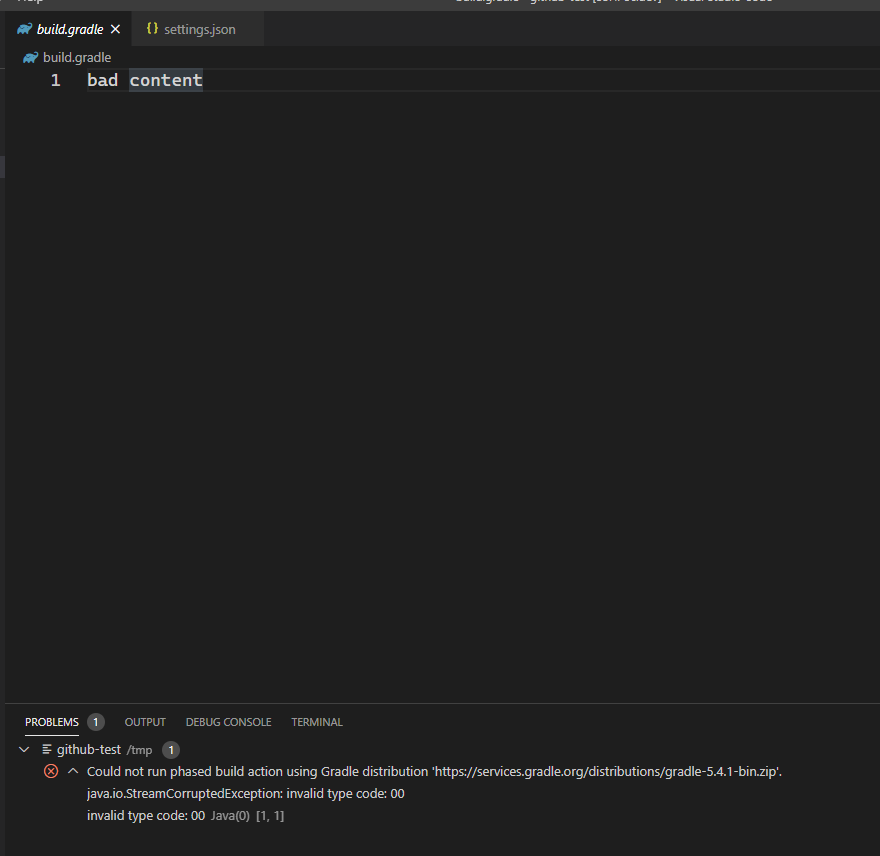
Hope that makes sense now @snjeza.
jakegt1 commentedon Feb 17, 2021
This is still making development in java 8 a pain, does the above example make sense now?
snjeza commentedon Feb 17, 2021
@jakegt1 The errors have been generated by the buildship project. The issue can be reproduced in Eclipse.
jakegt1 commentedon Feb 24, 2021
@snjeza so, you're suggesting it is a downstream problem and i should make an issue there? Your comments seem to be directly opposite to what @fbricon said, so i am very confused.
CsCherrYY commentedon Apr 20, 2022
@jakegt1 It's a Gradle issue, which has been addressed in gradle/gradle#17397, and the milestone is 7.2RC, so you can upgrade your wrapper version to greater than 7.2 and this issue will disappear.
I just tried in Gradle 7.3 and the error message can show properly, regardless of the JVM version (8 or 11 or later). Could you try it again?
jakegt1 commentedon Jul 14, 2022
@CsCherrYY Can verify this now works - Thanks!