Repository navigation
Improve first-time / new user experience #1672


Description

I am teaching classes and recently switched from eclipse to vscode-java as the editor/IDE of choice in those classes. However, due to the recent JDK chaos (multiple OpenJDK distros, quick releases, LTS, non-LTS) and a few vscode quirks it has gotten fairly complicated to cleanly set up all my students’ vscodes.
Here are some questions and suggestions on how to improve the first-time experience:
- JDK handling: it would be quite neat if the extension downloads a ‘private copy’ of a JDK on first start (bundling it would bloat the download size too much I think) so that jdt.ls always has a private copy of it and doesn’t need to rely on java.home
- Furthermore it would be great to enable relative Paths for settings like java.home and java.configuration.runtimes so that I could create a vscode workspace with a local JDK for my students
- Launch the extension when opening a workspace containing java projects and not on first-open of a *.java file: I know it may be beneficial in some situations to lazy load the extension but for my use case it would be great to be able to autoload it (preferably with a *.vscode-workspace level setting). Right now my problem is that all java commands in the command palette are available but don’t work unless a java file has been opened and jot.ls has started
- The command “Java: Clean the java language workspace” must be executed way too often and the detection when to do it isn’t good enough just yet: If you change settings directly in settings.json, depending if the server has been started or not, you won’t get a notification to do it and the language server will be in some sort of undefined state, even if you close and restart vscode. My quick fix suggestion would be to enhance the detection of changes (basically if any java.* changed suggest to clean the workspace)
- Additionally, sometimes you’ll get the message that a java file is out-of-project and only syntax errors are reported while it is clearly inside a maven project (jdt.ls must have somewhat corrupted the workspace), is it possible to add a detection that if there’s a maven/gradle project present to also suggest to clean the workspace instead of silently failing?
Keep up the good work! If you need further info on those subjects please let me know.
Environment
- Operating System: any
- JDK version: any
- Visual Studio Code version: 1.50.1
- Java extension version: 0.69.0
Activity
testforstephen commentedon Oct 26, 2020
@bagrupe Really great feedback. thanks.
a java file is out-of-project and only syntax errors are reportedmeans the opened file is not on the source path. If you're opening a Java file under src/java/main folder of your Maven project, that must be a bug, and please share us a sample to reproduce.bagrupe commentedon Oct 26, 2020
@testforstephen Thanks for the comment, this is my follow-up:
testforstephen commentedon Oct 26, 2020
pom.xml,build.gradleor.classpath. For your case, you could add a fake empty.classpathfile in your root to make the extension to be activated on startup. But you need be cautious about this. You shouldn't manually add.classpathfile if your root already contains some explicit build descriptor file such as pom.xml or build.gradle.bagrupe commentedon Oct 26, 2020
testforstephen commentedon Oct 26, 2020
Eskibear commentedon Oct 28, 2020
The original goal of the Coding Pack is to help install the minimum requirements for vscode Java. It will detect JDKs installed and point
java.hometo the latest one if its major version is > 11. Otherwise it will download and install AdoptOpenJDK 11.Actually
java.homedoesn't matter much to your projects, it's used to launch Java Language Server. As you mentioned, I myself agree that ultimatelyjava.homeshould be removed, and we pre-pack/download the JDK to launch itself. (as far as I know IntelliJ IDEA packs a "private distribution" inside to launch itself).It's not opensourced, but we do have a Github repo for issue tracking. https://github.com/microsoft/vscode-java-installer
marlemie commentedon Oct 28, 2020
Just to chime in regarding the out of project error. I had the same error in a project as simple as it gets:
I am just starting with Java so I want to keep it as simple as possible at the moment. I started the project with an "incorrect" folder structure, moved the files around a bit until it was correct, but then was faced with the "not on the classpath of project" error message. Only cleaning the workspace helped.
indexlongrun commentedon Oct 29, 2020
Hi @Eskibear I wanted to give a windows user perspective.
I'm an experienced Java developer and I really like VS Code but installing the java plugin has proven very challenging.
I have the coding pack installed but I still get this message:
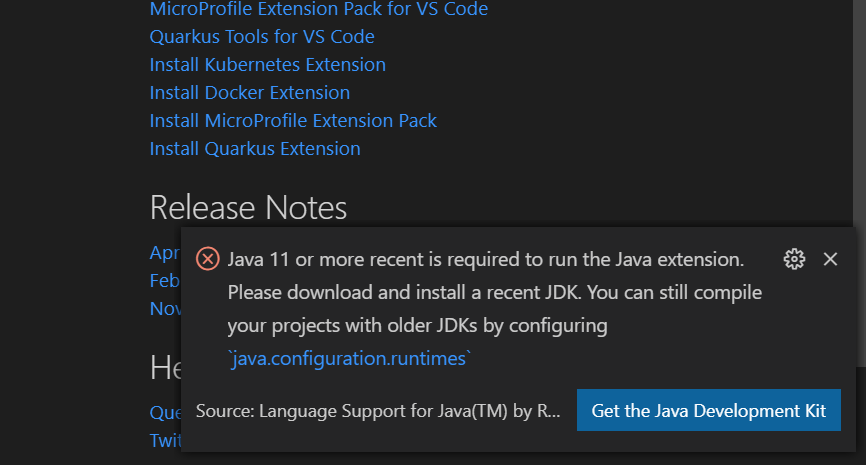
So nothing is automatic here.
When I follow the link to download I reach the download of the 1.8 jdk which is the wrong version.
After finding the right version and manually installing it with the default settings VS code is still not able to find and use it.
Eskibear commentedon Oct 29, 2020
@indexlongrun Thank you for the feedback!
Did the coding pack install a JDK 11 for you? I guess that before installing the coding pack, you already have a JDK 8 installed on your machine, and JAVA_HOME is pointing to it. Let me know if I'm right.
True, the JDK detection should be improved. It's tracked in #1621 . To work it around for the moment, you have to manually set
java.hometo a JDK 11+. We are also exploring ways to guide you, e.g. via some GUI you can one-click to configure that.indexlongrun commentedon Oct 29, 2020
@Eskibear, thank you for your attention and response
No
Yes, you are correct.
Adding my two cents:
The process in question is to install a JDK 11 or higher to enable the Java extension. This means that the user most likely dose not yet have any Java projects running in vs code.
At this point the user is more concerned with installing the Java extension than compiling future projects with old JDKs.
I would suggest updating the message and focusing on the java.home setting since it is something that the user must currently update to use the extension.
deftdawg commentedon Dec 10, 2020
I'm also seeing this "java.configuration.runtimes" on a machine with Mac with openJDK 15 installed via brew.
Detected JDKs just spins infinitely; don't get why it doesn't lookup the PATH JDK location w/
java -XshowSettings:properties -version 2>&1 | grep java.homeand assuming it contains a properbin/javacdefault to that location?Eskibear commentedon Dec 10, 2020
@deftdawg
We do check PATH for javac, and it might be a bug in your case.
Please open an issue https://github.com/microsoft/vscode-java-pack/issues , providing OS version (Big Sur?), how you install JDK 15(looks like homebrew?), any other JDK installed, value of $PATH and $JAVA_HOME. Thanks.
Currently you can simply point setting
java.hometo the path in your screenshot to work it around.Eskibear commentedon Sep 17, 2026
close as stale?