Repository navigation
Autocompletion needs an horizontal scrollbar #249

Description

Recently, I try to write java by VSCode. The extension is helpful for me to modify When the code needs minor repairs. I thank you for the great job you’re doing with this extension.
But, I have a terrible experience when I try to import module. As follows:
The picture show the issue when the name of module is too long to show completely, and there is not horizontal scroll bar. So, I can't correctly import module that I want.
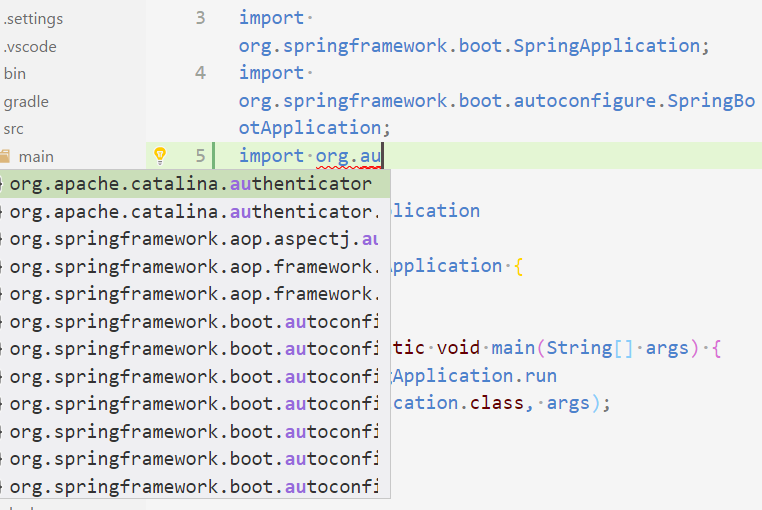
I hope a new way to solve the problem, such as, adding horizontal scroll bar or complete the sub-module of module only.
Activity
fbricon commentedon Jun 28, 2017
We can't add an horizontal scrollbar, it has to come from vscode proper.
In the mean time, if you already know the type you want to import you can do:
It'll add the fully qualified class name
[-]I hope a new way to autocomplete in import.[/-][+]Autocompletion needs an horizontal scrollbar[/+]ramya-rao-a commentedon Sep 14, 2018
@fbricon In the above case, can the completion provider be updated to not show
import.org.in each of the results when the user has already typedimport.org.?I believe
.is a trigger character which means the completion provider will be triggered when the user types.. At this point, the completion provider should only return the remaining part of the import.Yanpas commentedon May 14, 2019
I suggest following way to fix it:

there is a "More" switcher in completion list
We can always show full class name in "More" section, currently it's empty.
with "More" on:


with "More" off:
This requires fixes on the server side
testforstephen commentedon Oct 10, 2019
@Yanpas i didn't see the "More" switcher in my environment, how did you enable it in completion list?
testforstephen commentedon Oct 10, 2019
i see, clicking it will expand the java doc at the right side.
Eskibear commentedon Oct 27, 2020
VS Code Insiders now supports to resize completion widget.
See microsoft/vscode#29126 (comment)
fbricon commentedon Oct 27, 2020
Closing since vscode upstream fixed it, will be available in the October release (prolly around the 1st week of November)

For the impatients, you can download vscode-insiders from https://code.visualstudio.com/insiders/