You signed in with another tab or window. Reload to refresh your session.You signed out in another tab or window. Reload to refresh your session.You switched accounts on another tab or window. Reload to refresh your session.Dismiss alert
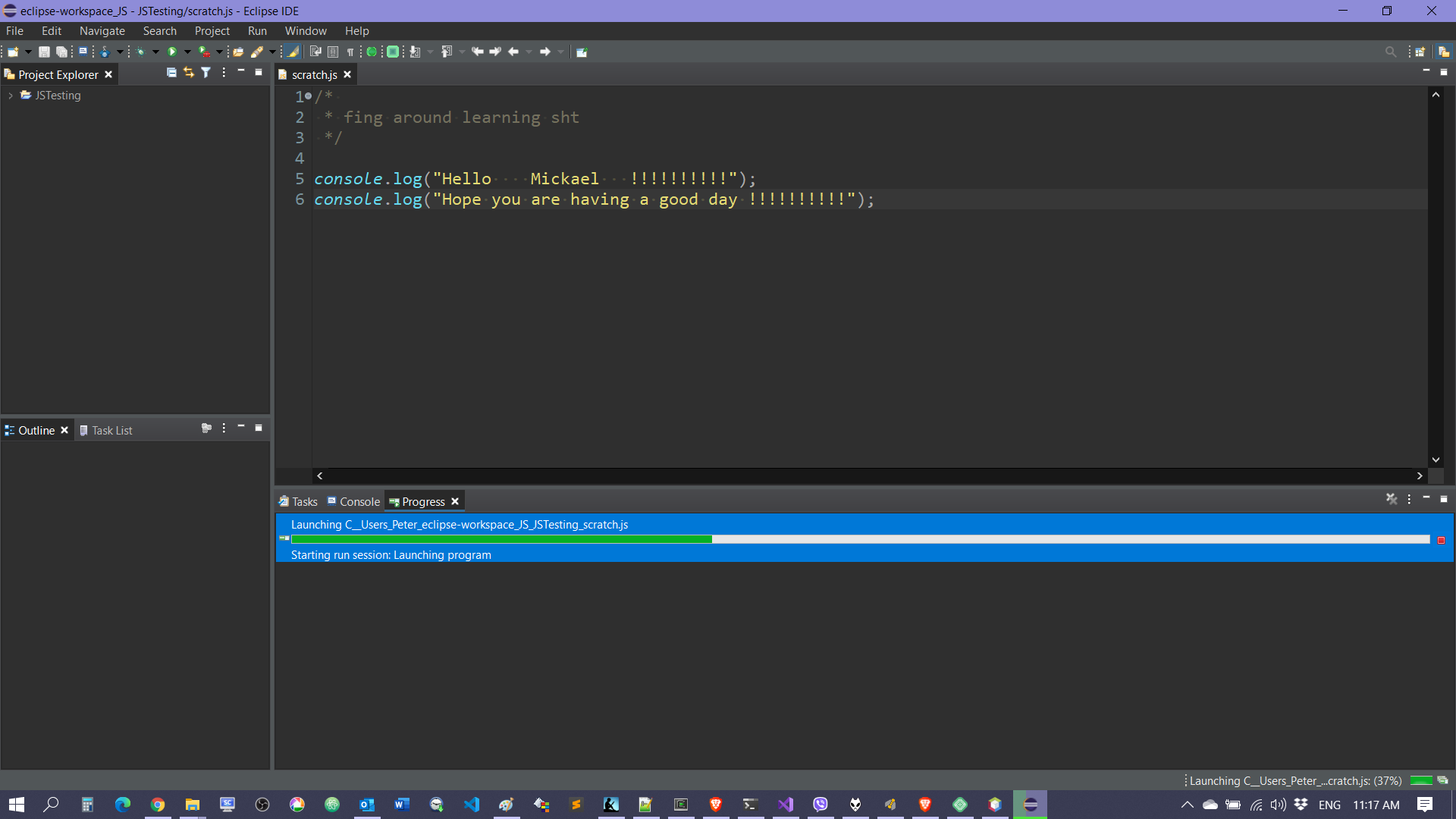
I've written a script and im trying to run it to view it in the console in Eclipse but when I click the run button i just get a "Starting run session Launching program" message and it hangs at 37%. Whats wrong with my setup?
node version is v12.14.1. I am running it by pressing the run button in the toolbar. "node.js application", the configuration of which is mostly empty. ${workspace_loc:/sorter/app.js} as the main file and sorter as the project.
the default terms/values you're seeing seem different than usual Wild Web Developer ones; can you please share a screenshot of the launch configuration?
Did a complete reinstall of eclipse removed all previous artifacts too. installed "Eclipse IDE for JavaScript and Web Developers" of eclipse and WWD. I get the same error, this time there is no configuration from the config window.
I know this issue is closed, but I am having the identical problem. I created a project, created one source file "foo.js" with two lines: "var foo = 1 + 1; foo;". When I click on run, it gets to 37% with "Starting run session: Launching program" and it just hangs there Eclipse 2020-03, Node (installed on /usr/local/bin) v 12.18.0. I copied and pasted this into node console, and it worked just fine.
Please reopen this bug. I'm using latest Eclipse 4.16 with latest Wild Web Developer 0.10.0.202006021616 and I see this behaviour every time I launch a Node.js file, via the Run As -> Node program context menu or a launch configuration of type Node.js application.
If the application has no output, the Console view hangs as well. Otherwise, the app finishes just nice in the Console view, but the progress bar remains active in the Progress view.
Also, occasionally (after an Eclipse restart), the launch would not succeed at all, even for applications with output. It just hangs.
Nope, that doesn't fix it. I'm running Wild Web Developer 0.10.4.20200921215 on Eclipse 4.17 and the behaviour stays the same, in the sense that the Console view doesn't hang anymore but the progress bar of the task in the Progress view hangs just as in @petesuch's screenshots.
Started a new Eclipse instance with one window in Resource perspective with one JS file open, issued the Run command and waited to see what happens. I have three Node.js processes alive and a hanged progress bar indicator reading "Starting run session: Launching program". The console displays what was expected from the dummy program I ran and is labelled "<terminated>".
Sorry, I wasn't clear. I was more asking for the commands of the started node process, as they appear in your process list. This is to know whether the expected node process is active or not.
Sorry for the 1 month delay 😏
After installing the latest Wild Web Developer 0.10.5.202012011111, I tested again and can say that the launched Node.js program does not remain running, it is only Eclipse that thinks so.
So, it's just the Progress view that is wrong.

Activity
mickaelistria commentedon Jan 21, 2020
Can you please elaborate how you're trying to run this? What is your version of node.js?
glend1 commentedon Jan 21, 2020
node version is v12.14.1. I am running it by pressing the run button in the toolbar. "node.js application", the configuration of which is mostly empty. ${workspace_loc:/sorter/app.js} as the main file and sorter as the project.
mickaelistria commentedon Jan 21, 2020
the default terms/values you're seeing seem different than usual Wild Web Developer ones; can you please share a screenshot of the launch configuration?
glend1 commentedon Jan 21, 2020
mickaelistria commentedon Jan 21, 2020
This Launch configuration is not from Wild Web Developer. Please the other one (with lower-case 'a' in "application").
glend1 commentedon Jan 21, 2020
That one does the same thing. Environment is empty and Debug adapter is also empty (override defaults is unchecked).
glend1 commentedon Jan 22, 2020
Did a complete reinstall of eclipse removed all previous artifacts too. installed "Eclipse IDE for JavaScript and Web Developers" of eclipse and WWD. I get the same error, this time there is no configuration from the config window.

mickaelistria commentedon Jan 22, 2020
Can you please create a configuration and fill it wit the expected values and see what happens?
glend1 commentedon Jan 22, 2020
The script runs. However, im still stuck with a never ending progress bar, it says "starting run session: initializing connection to debug adapter"
PyvesB commentedon Jan 22, 2020
I've also observed this quite a few times, even though I don't use these NodeJS script launches often.
mickaelistria commentedon Mar 13, 2020
I'm closing this one as Node.js scripts do run.
Please open a separate ticket for non-ending progress bar.
emrecio commentedon Jun 6, 2020
I know this issue is closed, but I am having the identical problem. I created a project, created one source file "foo.js" with two lines: "var foo = 1 + 1; foo;". When I click on run, it gets to 37% with "Starting run session: Launching program" and it just hangs there Eclipse 2020-03, Node (installed on /usr/local/bin) v 12.18.0. I copied and pasted this into node console, and it worked just fine.
a82kd commentedon Jun 7, 2020
Yes, I also have the same issue with this combination of versions
acarstoiu commentedon Jun 23, 2020
Please reopen this bug. I'm using latest Eclipse 4.16 with latest Wild Web Developer 0.10.0.202006021616 and I see this behaviour every time I launch a Node.js file, via the Run As -> Node program context menu or a launch configuration of type Node.js application.
If the application has no output, the Console view hangs as well. Otherwise, the app finishes just nice in the Console view, but the progress bar remains active in the Progress view.
Also, occasionally (after an Eclipse restart), the launch would not succeed at all, even for applications with output. It just hangs.
mickaelistria commentedon Jun 23, 2020
@acarstoiu Please open a new ticket with as precise as possible steps how to reproduce.
petesuch commentedon Sep 29, 2020
here is a screenshot of what they are probably talking about...

mickaelistria commentedon Sep 29, 2020
@petesuch Can you try installing the node embedder from https://download.eclipse.org/wildwebdeveloper/releases/latest/ ?
acarstoiu commentedon Nov 10, 2020
Nope, that doesn't fix it. I'm running Wild Web Developer 0.10.4.20200921215 on Eclipse 4.17 and the behaviour stays the same, in the sense that the Console view doesn't hang anymore but the progress bar of the task in the Progress view hangs just as in @petesuch's screenshots.
mickaelistria commentedon Nov 11, 2020
Do I get it right that the node program does execute, and the issue is that the progress bar is still here?
If so, can someone check
jstackand report the state of the various threads to sort out what can be locking this progress?
acarstoiu commentedon Nov 11, 2020
Started a new Eclipse instance with one window in Resource perspective with one JS file open, issued the Run command and waited to see what happens. I have three Node.js processes alive and a hanged progress bar indicator reading "Starting run session: Launching program". The console displays what was expected from the dummy program I ran and is labelled "<terminated>".
The output of
is attached (11492 is Eclipse's PID).
jstack.txt
mickaelistria commentedon Nov 11, 2020
Can you please share which commands were actually running?
acarstoiu commentedon Nov 11, 2020
I pressed Run As -> Node program context menu on a simple file called lang.js. Nothing else, I kept it as simple as possible.
mickaelistria commentedon Nov 11, 2020
Sorry, I wasn't clear. I was more asking for the commands of the started node process, as they appear in your process list. This is to know whether the expected node process is active or not.
acarstoiu commentedon Dec 12, 2020
Sorry for the 1 month delay 😏
After installing the latest Wild Web Developer 0.10.5.202012011111, I tested again and can say that the launched Node.js program does not remain running, it is only Eclipse that thinks so.
So, it's just the Progress view that is wrong.
mickaelistria commentedon Dec 12, 2020
Thanks for the feedback. The progress issue is tracked by #581 .