Repository navigation
Intellisense suggestions should display an horizontal scrollbar if needed #29757


Description

- VSCode Version: 1.13.0
- OS Version: macOS Sierra 10.12.5
Steps to Reproduce:
- install java extension
- open java file
- type
import o, wait for suggestions to show up
suggestions are truncated because the package names don't fit in the suggestion window, there's no way to scroll horizontally
See redhat-developer/vscode-java#249
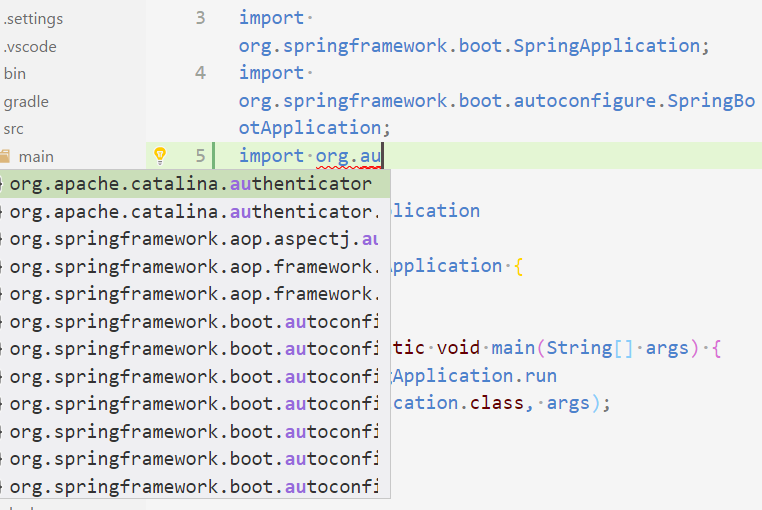
Reproduces without extensions: Maybe
Activity
stevencl commentedon Nov 16, 2017
I am not sure how well a horizontal scroll bar would work. How difficult would it be to increase the width to accomodate these longer strings, if the string is longer than would fit in the default width?
The problem with the scroll bar is that once you scroll to the right, you need to scroll back to the left if you arrow down and the next item is much shorter in length. A solution to that would be to auto scroll back to the left after making another selection but then that could run into problems if the list looks like the screenshot above.
fbricon commentedon Nov 16, 2017
This is the behaviour I see in Eclipse. With a trackpad, it's absolutely manageable.
I think this would give users less surprises than trying to autoscroll back when changing the selection.
A better solution would probably be to scroll left only if the selection text size is lower than the x-position of the currently visible pane, but that's probably too complicated
hdorgeval commentedon Nov 16, 2017
One of my colleague shows me that, in the css that drives the suggestion list, there is a width:50% that is set. when forced to 100%, the width of the suggestion list is then ok (no cropping). It could be great if the suggestion-list max width could be parameterized directly in the workspace settings
hdorgeval commentedon Nov 16, 2017
Here is a screenshot of this css rule:

When I set the value to 70%:

hdorgeval commentedon Nov 16, 2017
I have also discovered that if you reduce the width of the VS Code editor window, then suddenly there is no more cropping as shown by the following sceenshot:

emeentag commentedon Dec 24, 2017
This is definitely a usability issue and please take care of it. I am pretty sure you can solve it in a good way. Also as Fred Bricon (@fbricon) said in eclipse and others there is horizontal scroll bar appears if horizontal scroll bar needed. Also you can resize the suggestion bubble with catching it and dragging from bottom right corner.
31 remaining items
akaroml commentedon Dec 4, 2019
Just tried to put the short name in the front and it looks good enough for me. What do you think? Fred Bricon (@fbricon)

akaroml commentedon Dec 4, 2019
Further playing with my modification, there is actually a new problem. As I keep on typing "spring" to limit the search scope, the highlighting works in a weird way. I was expecting the term "org.spring" to be highlighted, but only "spring" is. I guess it has something to do with the string match algorithm in vscode.
hxuanhung commentedon Dec 10, 2019
In case anyone wants to use the hack above, on Mac and vscode (1.41.0-insider) file name is changed to
workbench.desktop.main.cssmahop-net commentedon Mar 11, 2020
What is the situation right now? Also for JS Development this box is pretty small? Resizing the Box with the mouse and remembering the width and hight for the next time would be great...
Or a setting somewhere here: (Workspace and User)
ValentinH commentedon Apr 20, 2020
A pretty similar issue is with the "auto-import" labels which are way too short:

When you are importing a type with a common name, it's really hard to know which one to import.
ValentinH commentedon Apr 20, 2020
I actually noticed that if you hover the row, there is an "i" icon.

If you click on it, the description will be shown in a new popup attached to the first one:

The best part is that once you clicked it, it will stay in this mode for the next time.
jayjun commentedon May 19, 2020
To everyone resorting to the CSS hack, upvote #30140 to make bottom suggestion details permanent.
chetrf commentedon Jun 14, 2020
To anyone having trouble getting the CSS hack to work, one more detail that finally made it work for me: I had to change the Editor: Suggest Font Size from zero to something smaller than my default font. I had almost given up on getting the CSS hack to work. After I did that the change from 50% to 100% worked. This is on MacOs Catalina.
It seems I can make it bigger, smaller, or zero and the CSS hack now works. Something about changing it made the change start working.
Jonathan0wh commentedon Jul 3, 2020
waiting for feature request #29126
JCKodel commentedon Jul 18, 2020
Install
be5invis.vscode-custom-cssextensionInsert this on your settings.json:
Press F1 to get the command palette and run
Reload custom CSS and JSRestart VSCode when requested in the notification
Ignore the "VSCode install is corrupt"
Nice full screen intellisense, with no jumping.
See? Is not that hard, Microsoft. I don't care if it is not right on the cursor position. I just care about being able to read the f☠ documentation ¬¬
jrieken commentedon Oct 26, 2020
The suggestions and the details part are going to be resizable (see #29126 (comment)). I am closing this as a related/duplicated issue.